
Reference
API
Everything the admin panel does is also available through the REST API (/api/v1); the panel itself uses this API. Scripts and automation tools authenticate with an API token.
Address
Call the API at the same address as the admin panel. The admin panel container passes the /api path on to the API container.
https://<server address>:81/api/v1The admin panel uses a self-signed certificate created at installation, so add -k to curl or configure it to trust that certificate. On the server itself you can also call the API port directly (http://127.0.0.1:9080/api/v1 in the standard installation).
API documentation (Swagger UI)
All endpoints with their request and response formats are in the Swagger UI. It opens without signing in.
https://<server address>:81/api/docsThe raw OpenAPI 3.0 specification is at /api/docs/swagger.yaml. The API Documentation button on the Account Settings → API Tokens tab opens the same page.
Creating an API token
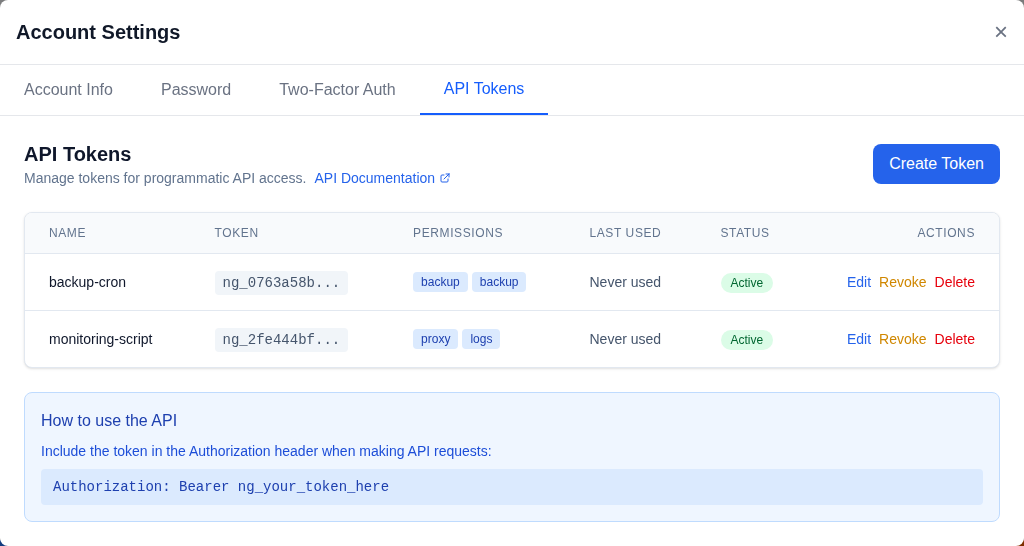
- Click your username at the top right to open Account Settings and go to the API Tokens tab.
- Click Create Token.
- Enter a Token Name and choose one of the Permission Groups, or pick Individual Permissions one by one.
- Optionally list the addresses allowed to use the token, comma separated, in Allowed IPs (Optional), and choose Expires In.
- Copy the token (it starts with
ng_). It will not be shown again.
| Permission group | Permissions |
|---|---|
| Read Only | proxy:read, certificate:read, waf:read, logs:read, settings:read, backup:read |
| Operator | proxy:read, proxy:write, certificate:read, certificate:write, waf:read, waf:write, logs:read, settings:read, backup:read, backup:create |
| Full Access | * (everything) |
What each individual permission reaches:
| Permission | Scope |
|---|---|
proxy:read, proxy:write | Proxy hosts, redirect hosts, access lists, auth providers |
proxy:delete | Deleting proxy hosts and redirect hosts |
certificate:read, certificate:write, certificate:delete | Certificates and DNS providers |
waf:read, waf:write | The whole WAF / Blocking menu (banned IPs, global security defaults and so on) |
logs:read | Logs |
settings:read | Reading settings, the dashboard, DDNS, the audit log, API tokens and logs |
settings:write | Changing settings, DDNS, API tokens and logs |
backup:read, backup:create, backup:restore | Listing, creating and restoring backups |
user:read | Listing users |
A token cannot have more permissions than the role of the person who creates it. Choosing a permission the role lacks refuses the creation, and if the role is narrowed later, what the token can do narrows with it. Revoke or Delete in the token list stops a token immediately. Token use is recorded in Logs → Admin Audit → API Token Usage.
Authentication
Send the token in the Authorization header of every request.
Authorization: Bearer ng_your_token_hereA sign-in session token from the admin panel works in the same header. Session tokens come from POST /api/v1/auth/login (followed by POST /api/v1/auth/verify-2fa with two-factor authentication) and are valid for 24 hours. For automation, API tokens are recommended, since their expiry and permissions can be set separately.
Example calls
The examples assume these two variables:
export NPG_URL="https://192.0.2.10:81"
export NPG_TOKEN="ng_your_token_here"
List proxy hosts (proxy:read)
curl -k -H "Authorization: Bearer $NPG_TOKEN" \
  "$NPG_URL/api/v1/proxy-hosts?page=1&per_page=50"
A page holds at most 100 hosts, and search matches domain names and the forward address.
Create a proxy host (proxy:write)
curl -k -X POST "$NPG_URL/api/v1/proxy-hosts" \
  -H "Authorization: Bearer $NPG_TOKEN" \
  -H "Content-Type: application/json" \
  -d '{
    "domain_names": ["app.example.com"],
    "forward_scheme": "http",
    "forward_host": "192.0.2.20",
    "forward_port": 8080
  }'
NPG writes the configuration, checks it with nginx -t and applies it. If the check fails, the host is not saved either. On success the answer is 201 with the new host. If the domain already exists, the answer is 409.
Ban and unban an IP address (waf:write)
# Ban for one hour (3600 seconds). A ban_time of 0 is permanent.
curl -k -X POST "$NPG_URL/api/v1/banned-ips" \
  -H "Authorization: Bearer $NPG_TOKEN" \
  -H "Content-Type: application/json" \
  -d '{"ip_address": "203.0.113.50", "reason": "manual ban from script", "ban_time": 3600}'

# Unban by address
curl -k -X DELETE -H "Authorization: Bearer $NPG_TOKEN" \
  "$NPG_URL/api/v1/banned-ips?ip=203.0.113.50"
With proxy_host_id in the body the ban applies to that host only; without it, it applies to every host.
Errors and rate limits
| Response | Meaning |
|---|---|
401 | The token is missing, wrong, expired or revoked. |
403 | The call came from an address not in Allowed IPs, or the token lacks a permission. The required field of the answer names the permission needed. |
409 | A duplicate (such as a domain), or the configuration was saved but the running nginx refused to reload (code is nginx_reload_rejected). |
429 | The rate limit was exceeded. |
The API has a per-IP, per-minute rate limit: 600 requests for the general API and 100 for the sign-in endpoints by default, changed with API_RATE_LIMIT_PER_MINUTE and AUTH_RATE_LIMIT_PER_MINUTE (Environment variables). The response headers X-RateLimit-Limit, X-RateLimit-Remaining and X-RateLimit-Reset show what is left.
Status endpoints
| Endpoint | Authentication | Use |
|---|---|---|
GET /health | none | Check that the API answers |
GET /api/v1/status, GET /api/v1/health/detailed | any API token, whatever its permissions | Status checks from monitoring tools |
GET /metrics | none | Prometheus metrics. Open only on the API port (127.0.0.1:9080). |