
Features
Access lists and basic auth
An access list decides which clients may reach a proxy host. It allows or denies IP addresses and ranges, allows domains such as DDNS names, and can ask for a username and password (HTTP basic authentication). One list can be shared by several hosts.
Where it is
Create lists under Access Control in the top menu, and attach one to a host under the proxy host's edit dialog → Security tab → Access List.
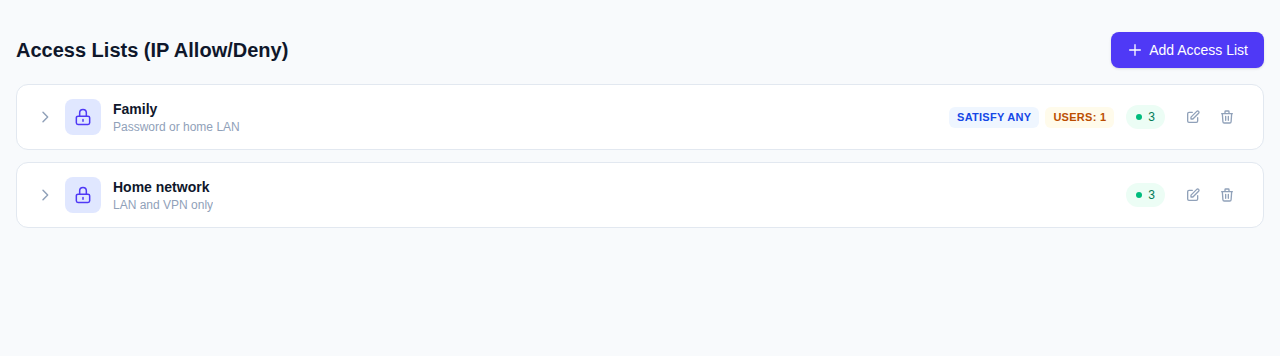
For each list the page shows the number of rules, its options (Satisfy Any, Pass Auth), the domains it allows with their state, and the number of users.
List settings
Add Access List opens the editor.
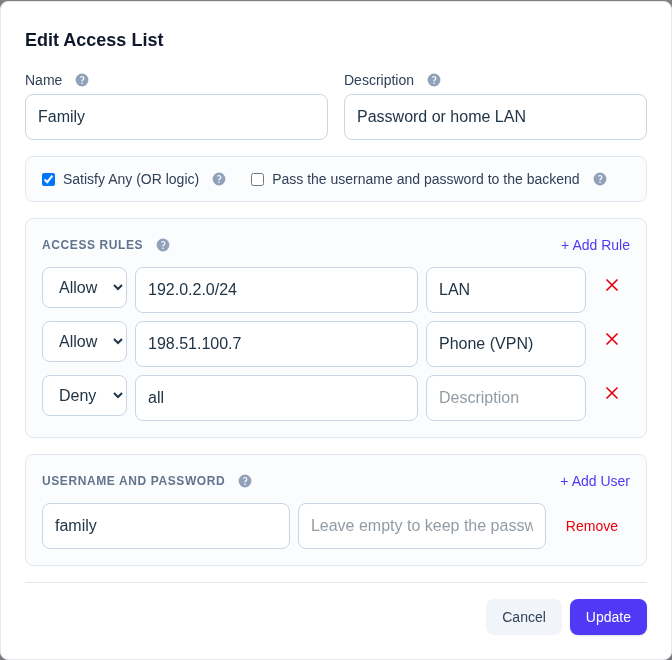
| Field | Meaning | Default |
|---|---|---|
| Name | The list name (for example Office IPs) | none |
| Description | A note | empty |
| Satisfy Any (OR logic) | When on, matching either the access rules or a username and password is enough. When off, both must match. It makes no difference on a list without users. | on |
| Pass the username and password to the backend | Sends the signed-in username and password (the Authorization header) on to the backend. When off, NPG removes the header after checking it. Turn it on only if the backend takes the same kind of login. | off |
| Access Rules | Allow or Deny and an address: an IP (192.0.2.10), a CIDR range (198.51.100.0/24), all, or a domain (partner.example.com). Each rule can have a description. | none |
| Username and password | Users that the hosts using this list ask for. A username cannot contain a colon (:) or a space and is at most 64 characters; a password has at least 8 characters. Leaving an existing user's password empty keeps it. | none |
Evaluation order
nginx checks a list in this order and stops at the first rule that matches.
- The global trusted IPs (Settings → WAF Auto-Ban) are allowed first.
- The IP, CIDR and
allrules are checked from the top down. - Addresses allowed through domain rules are checked. Domains come after every IP rule, so an address that an IP rule denies stays denied even if a domain resolves to it.
- Any list with at least one rule ends with
deny all. A client that matches no rule is denied.
So to block a few addresses and leave the host open to everyone else, add Allow all as the last rule after the deny rules.
Deny   203.0.113.50
Deny   198.51.100.0/24
Allow  all
A request the access list denies gets NPG's block page (403) and is logged with the block reason Access Denied.
Username and password
When a list has users, browsers ask for a username and password on the hosts that use it.
| Satisfy Any | Who gets in |
|---|---|
| on | An IP the access rules allow (global trusted IPs included) gets in without a password; any other address gets in with a valid username and password. |
| off | The IP must be allowed by the access rules and the username and password must also be valid. |
A list with Satisfy Any on and an Allow all rule allows every address, so no password is asked.
Domain entries
An allow rule can use a domain name (such as a DDNS name) instead of an IP. NPG looks the name up on a schedule and lets nginx allow only the addresses it finds. This is useful when a home connection's public IP changes often.
- Domains can only be allowed. Deny with IP addresses.
- Names are looked up again every minute by default. A new address is allowed after the same answer came twice in a row and the minimum apply gap (300 seconds by default) has passed; an address that disappears is blocked at the next check.
- Private, reserved, loopback and CDN addresses are not allowed. While lookups fail, the last addresses are kept for a set time (24 hours by default).
- A domain whose CNAME target changes, that comes back with an address it never had before, or whose addresses change too often in a day (more than 6 times by default) moves to Review needed and lets no one in until you click Allow again on the access lists page.
- A list can hold 16 domains and all lists together 64 by default, and one domain can have up to 4 IPv4 and 4 IPv6 addresses.
These values are changed under Settings → Domain entries (DDNS). Keep in mind that whoever controls the domain's DNS (the DDNS account owner) controls this exception.
Attaching a list to a host
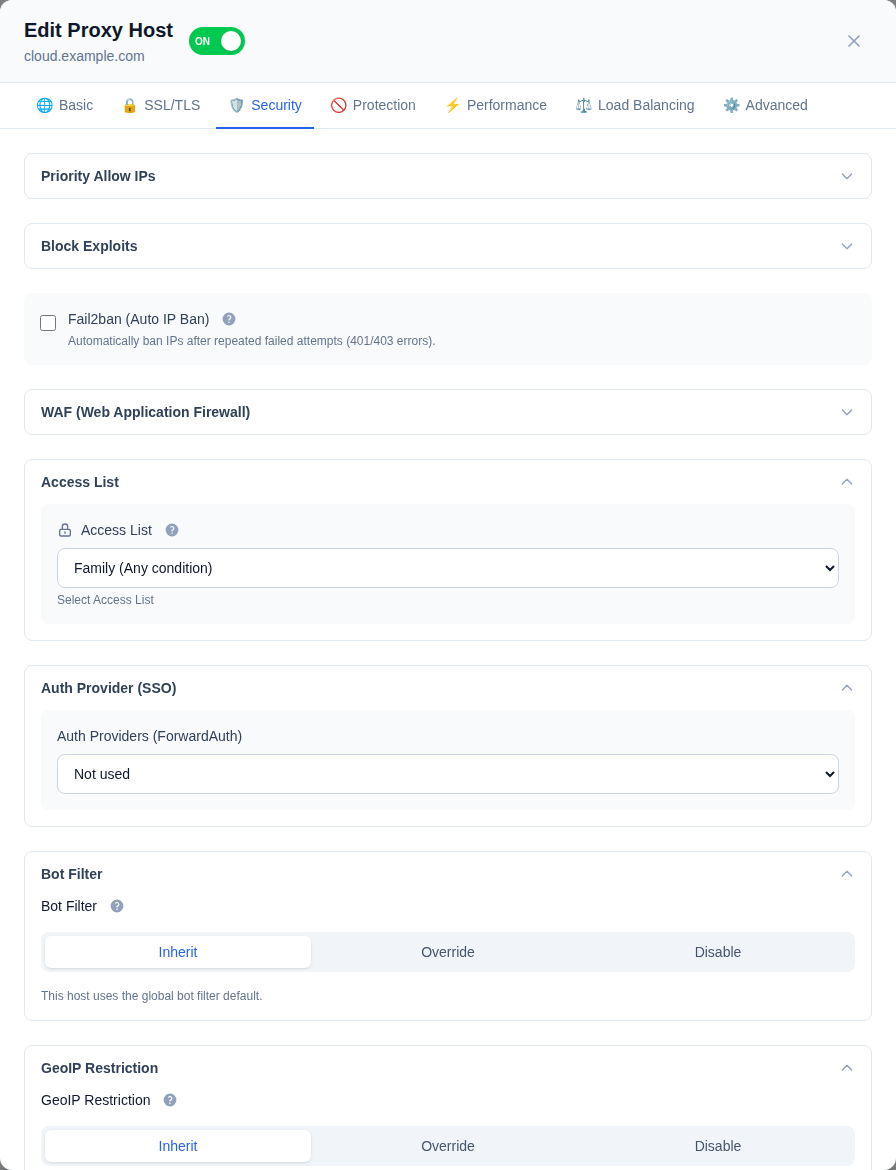
Choose the list under the proxy host's edit dialog → Security tab → Access List. Each option shows the list name and whether Satisfy Any is on, as (Any condition) or (All conditions). No access restrictions detaches the list.
Interaction with other features
- Global trusted IPs pass the access list. Global trusted entries entered as domains, however, do not pass the list of a host that has a login (ForwardAuth and the like), nor an address the list denies by an explicit IP rule.
- ForwardAuth: a list with users cannot be attached to a host that uses ForwardAuth.
- Geo and cloud challenges: on hosts that use a list with users, challenge mode blocks instead. On hosts where a challenge is on, Satisfy Any is not applied, so a client must pass both the access list and the challenge.
- Login bypass warning: when a list with Satisfy Any on has domain entries and the host has a login (ForwardAuth, or
auth_requestorauth_basicin the Advanced Config), clients at those domains' addresses get in without logging in. The interface shows a warning; turn Satisfy Any off to require both. - Other blocks: an address the access list allows is still subject to URI path blocking, the WAF and automatic bans (Fail2ban, WAF auto-ban). Which list exempts a client from which control is in Trusted IPs, exceptions and precedence.
- Cloudflare and other proxies in front: behind a proxy, set Settings → Trusted Proxies first so the list judges the visitor's address rather than the proxy's. See Running behind Cloudflare.
Limits
- A host uses one access list at most.
- Redirect hosts and TCP/UDP stream hosts cannot use access lists.
- A
locationwritten in the Advanced Config passes theAuthorizationheader on even when "Pass the username and password to the backend" is off. - The Advanced Config cannot contain a
satisfydirective; use the list's Satisfy Any instead.