
Guides
Trusted IPs, exceptions and precedence
By the end of this page you know which list to put an address in, such as your home or office network or a monitoring server, so that it skips exactly the blocks you intend. NPG has no list that "bypasses everything". Each list skips a different set of controls, so choose with the table below.
Before you start
- If Cloudflare or another reverse proxy sits in front of NPG, set up Settings → Trusted Proxies first. Every list compares against the visitor address decided there. Without it, the lists see the proxy's address instead of the visitor's. (Running behind Cloudflare)
- Write the addresses as IPs or CIDRs. The examples here use an office range
192.0.2.0/24and a monitoring server198.51.100.20.
The lists
| List | Where | Applies to |
|---|---|---|
| Priority Allow IPs | Proxy host → Security tab → Priority Allow IPs | That one host |
| Priority allow IPs of the global GeoIP default | WAF / Blocking → Global GeoIP | Hosts that inherit GeoIP, while the global GeoIP default is on |
| Global Trusted IPs | Settings → WAF Auto-Ban → Global Trusted IPs | Every host |
| Trusted IPs also bypass the WAF (ModSecurity) | Toggle below the Global Trusted IPs list | Every host, off by default |
| Feature exceptions | Inside each feature's settings (last column below) | That one feature |
Which list skips which block
"Skipped" means the block does not apply to addresses on that list. "—" means the list has no effect on that block.
| Block | Host's Priority Allow IPs | Global Trusted IPs | The feature's own exception |
|---|---|---|---|
| GeoIP Restriction (block and challenge) | Skipped | Skipped | Allow Private IPs, Allow Search Bots |
| Cloud Provider Blocking | Skipped | Skipped | Allow Search Bots |
| Bot Filter | Skipped | Skipped | Allow Search Engines, Custom Allow List (User-Agent) |
| Rate Limit (per host and Global Rate Limit) | — | Skipped | Whitelist IPs |
| DDoS protection (Settings → Global Settings → Advanced) | — | Skipped | — |
| Access lists | — | Passes the IP rules (see below) | The list's Allow entries |
| Banned IPs (manual bans, Fail2ban and WAF auto-bans) | — | Skipped | — |
| IP blocks from filter subscriptions | — | Skipped | The subscription's Exclude Private IP Ranges, per-entry exclusions |
| Fail2ban (per host and global) | — | Not counted | Never ban local network addresses |
| WAF Auto-Ban | — | Not counted | — |
| WAF (ModSecurity) | Skipped (IP entries only) | Skipped only with Trusted IPs also bypass the WAF (ModSecurity) on | Rule exclusions (whole host, path, argument) |
| Block Exploits | — | — | Per-rule URI exceptions (global and per host) |
| URI blocks | — | — | Exception IPs, Allow Private IPs |
What the table shows:
- Priority Allow IPs skip only the host's GeoIP, cloud provider blocking, bot filter and WAF. They have no effect on rate limits, banned IPs, Fail2ban or Block Exploits. An address on the Priority Allow list can still be banned by Fail2ban, and once banned it is blocked on that host too.
- Global Trusted IPs skip almost everything except the WAF and Block Exploits, and are never counted by Fail2ban or WAF Auto-Ban. An address that is already on the ban list is not blocked while it is on the Global Trusted IPs list.
- Block Exploits and URI blocks are not skipped by any trust list. They only look at their own exceptions.
- Loopback addresses (
127.0.0.1and so on) and addresses listed under Trusted Proxies are never banned by Fail2ban or WAF Auto-Ban, whatever the settings.
Access lists and Global Trusted IPs
Global Trusted IPs are allowed before an access list's IP rules. An address the list Denys still passes the IP rules if it is on the Global Trusted IPs list. When the access list also has a username and password, it depends:
- With Satisfy Any (OR logic) on, a Global Trusted IP gets in without a password.
- With it off, both the IP and the password must match, so a Global Trusted IP still has to enter the password.
Domain entries
Priority allow, Global Trusted, rate limit whitelists, URI block exceptions and access lists accept a domain such as a DDNS name instead of an IP. NPG looks the name up on a schedule and uses the addresses it finds. A domain entry skips less than an IP entry:
- A priority allow domain skips only GeoIP, cloud provider blocking and the bot filter. It does not turn off the WAF.
- A Global Trusted domain does not skip banned IPs, the IP blocks of filter subscriptions or the WAF, and Fail2ban and WAF Auto-Ban can still ban it. The Trusted IPs also bypass the WAF (ModSecurity) toggle applies to IP entries only.
Host settings and global defaults
GeoIP, the bot filter, cloud provider blocking, rate limits, security headers and the WAF each have a global default, and every host chooses Inherit, Override or Disable. The exception lists follow that choice.
- A host that Inherits uses the global default's exceptions. Its rate limit Whitelist IPs come from Global Rate Limit. Its GeoIP priority allow IPs are the host's own list plus the list in Global GeoIP.
- A host that Overrides uses only the exceptions entered on the host.
- The priority allow IPs of the global GeoIP default skip only GeoIP, cloud provider blocking and the bot filter. Only the Priority Allow IPs on the host's Security tab make that host's WAF skip an address.
- Global Trusted IPs and Fail2ban's Never ban local network addresses apply to every host, whether it inherits or not.
Details are in Global security defaults.
Choosing where to put an address
| Situation | Put it in |
|---|---|
| A monitoring server abroad is caught by one host's country block | That host's Priority Allow IPs |
| An office range should not hit country, bot or rate limits on any host, and should never be auto-banned | Global Trusted IPs |
| You only want to stop Fail2ban banning LAN devices | Never ban local network addresses in WAF / Blocking → Global Fail2ban |
| An internal scanning tool is blocked by WAF rules | For one host, that host's Priority Allow IPs; for every host, Global Trusted IPs with Trusted IPs also bypass the WAF (ModSecurity) |
| A legitimate request is blocked by one WAF rule | Rather than trusting an address, exclude that rule for a path or argument. See When the WAF blocks legitimate requests |
| A subscribed blocklist contains private ranges and blocks your LAN | Exclude Private IP Ranges on that subscription |
Setting it up
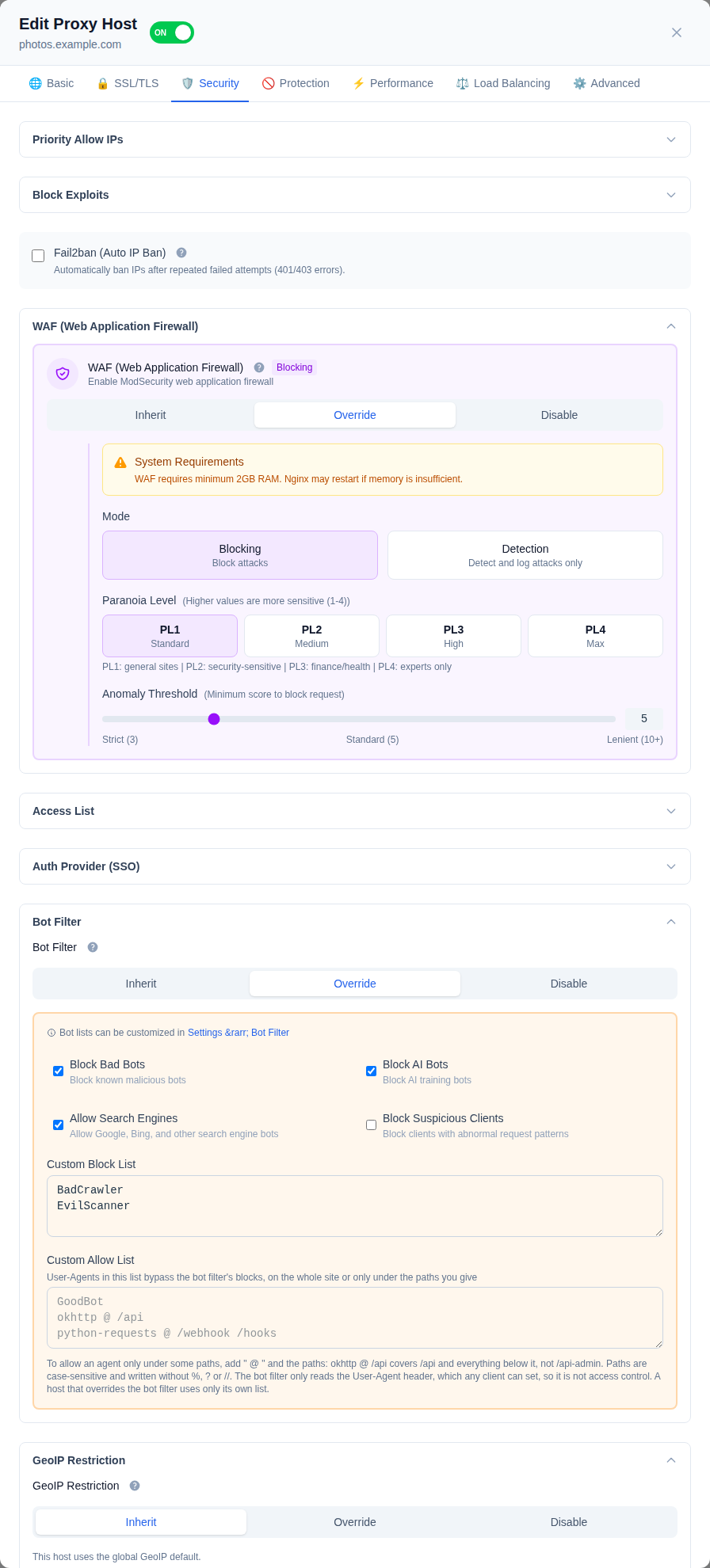
A host's Priority Allow IPs
-
Open the host under Proxy Hosts and go to the Security tab.
-
Enter one IP or CIDR per line in Priority Allow IPs.
198.51.100.20 192.0.2.0/24 -
Click Save.
Global Trusted IPs
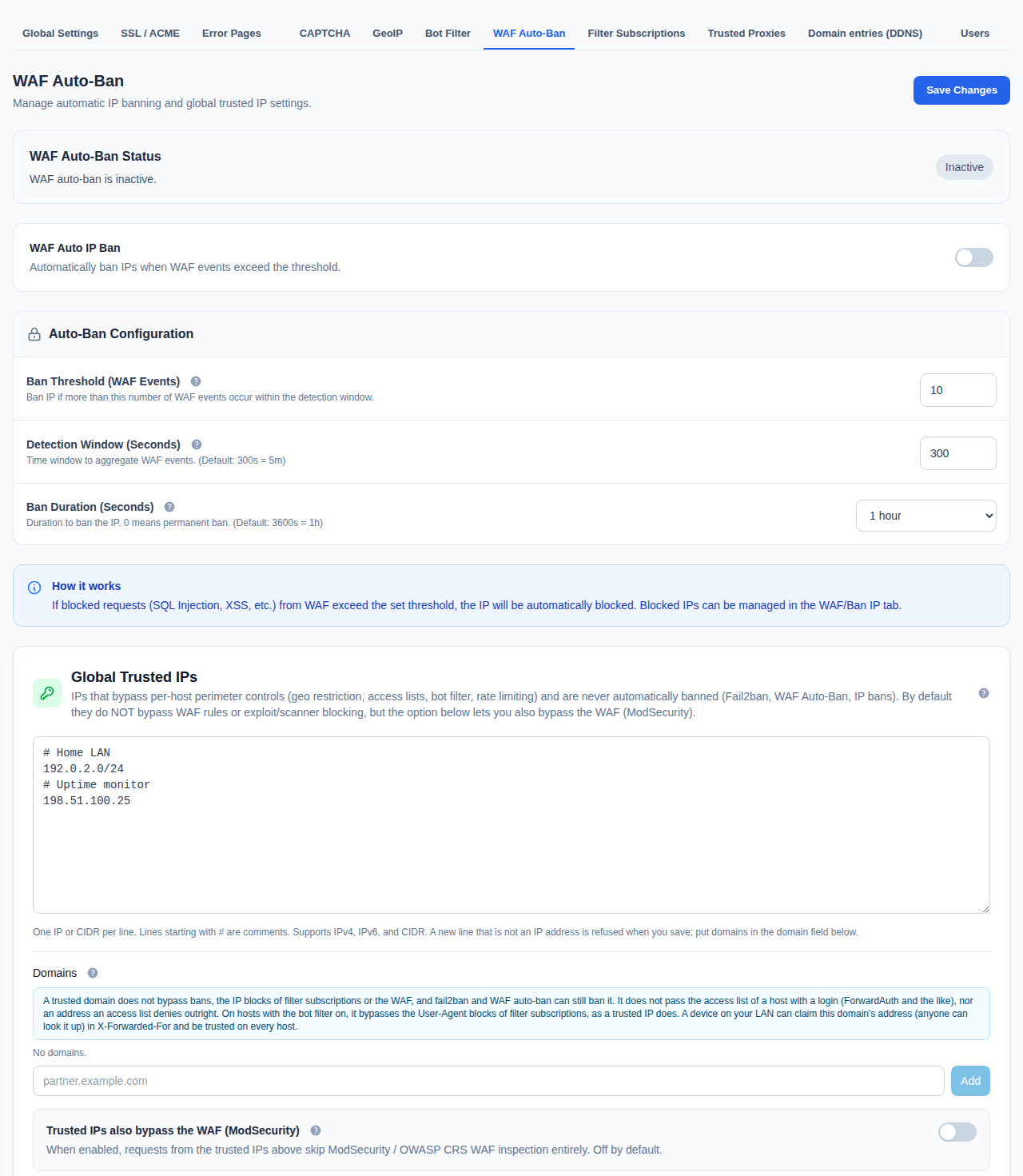
- Open Settings → WAF Auto-Ban.
- Enter one IP or CIDR per line in Global Trusted IPs. Lines starting with
#are comments. Domains go in the Domains field below. - Turn on Trusted IPs also bypass the WAF (ModSecurity) only when the WAF must be skipped too. It switches WAF inspection off completely for those addresses, so if a device on the list is compromised, attacks can reach your backends without WAF inspection.
- Click Save.
Keeping LAN addresses out of Fail2ban
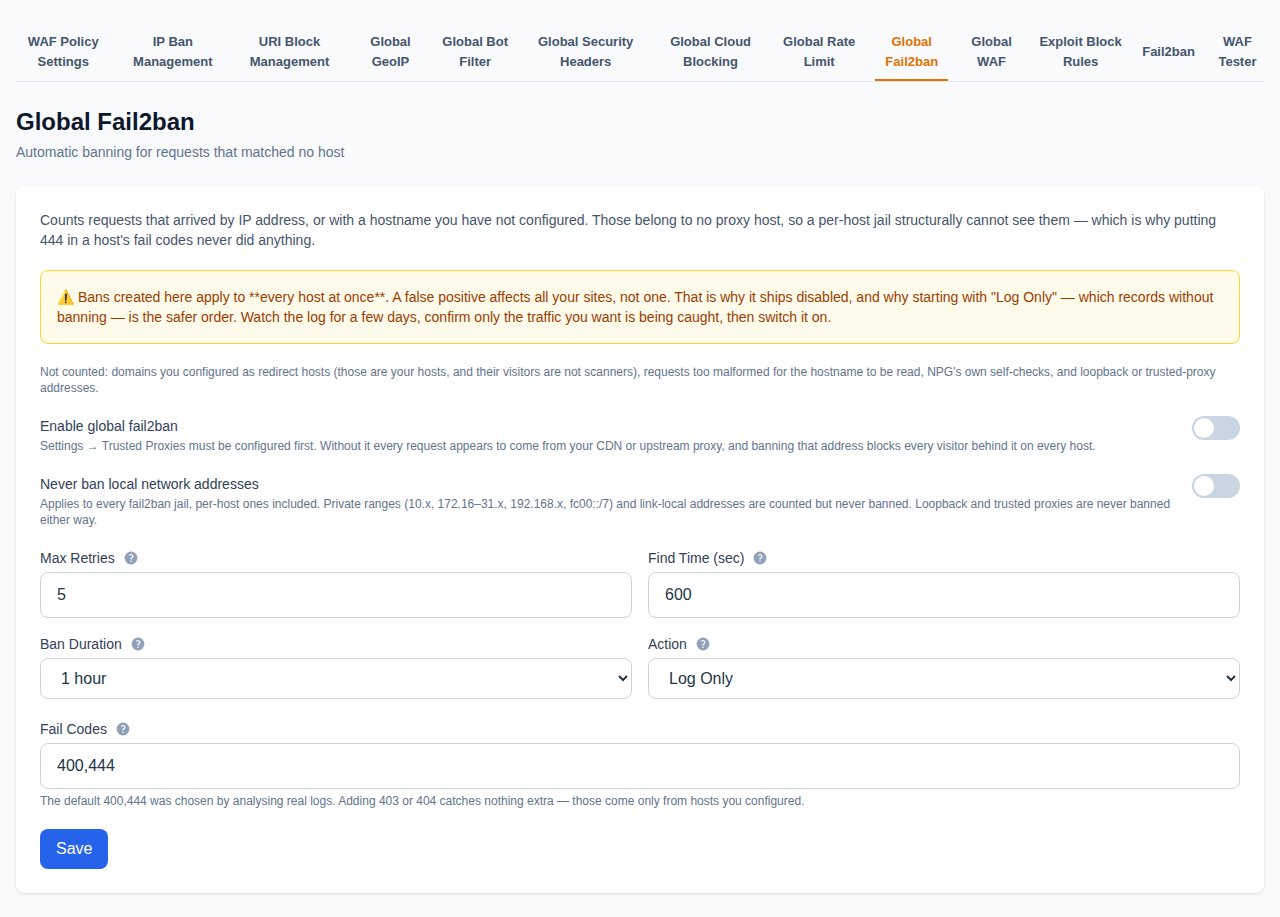
Turn on Never ban local network addresses in WAF / Blocking → Global Fail2ban. It applies to the per-host Fail2ban jails too. Private ranges (10.x, 172.16–31.x, 192.168.x, fc00::/7) and link-local addresses are counted but never banned.
Check that it works
- Make a request from the address, then find it in Logs → Access Logs. An empty Block Reason means it got through.
- If the address was banned before, look for a remaining ban in WAF / Blocking → IP Ban Management. Priority Allow IPs alone do not lift an existing ban, so remove it there.
Common problems
- It is on a list but still blocked. Look at the request's Block Reason in Logs → Access Logs and check in the table above that the list you used skips that block. For example,
Exploitis not skipped by any trust list. - The client IP in the logs is a proxy or CDN address, not the visitor. Settings → Trusted Proxies is not set up. Until it is, the lists are not compared against visitor addresses.
- The LAN cannot connect after enabling a filter subscription. Some blocklists contain private ranges. Open the subscription under Settings → Filter Subscriptions and turn on Exclude Private IP Ranges, or exclude the entry.
- A domain entry has no effect. Check under Settings → Domain entries (DDNS) that the name has been resolved.