
Features
Geo and cloud blocking
Geo blocking (GeoIP restriction) blocks or allows requests by the country of the client IP. Cloud blocking blocks requests from the IP ranges of cloud providers such as AWS and Azure; many scrapers and scanners run on cloud servers, so the two are often used together. Both can show a CAPTCHA instead of blocking (challenge mode).
Prerequisite: the GeoIP database
Geo blocking and the IP ranges of some cloud providers come from the MaxMind GeoLite2 databases.
- Create a free MaxMind account and generate a license key.
- Under Settings → GeoIP, turn on Enable GeoIP, enter the MaxMind Account ID and MaxMind License Key, and save.
- When the status lists the Country DB and ASN DB, you are ready. With Auto Update on, the databases are downloaded again daily, weekly or monthly, as you choose.
Until GeoIP is set up, a host's GeoIP Restriction section shows "GeoIP Not Available". With GeoIP on, logs and the dashboard also show countries.
Where it is
| Location | Contents |
|---|---|
| Proxy host edit dialog → Security tab → GeoIP Restriction, Cloud Provider Blocking | Per-host settings: choose Inherit, Override or Disable. |
| WAF / Blocking → Global GeoIP, Global Cloud Blocking | Defaults for every host set to inherit |
| Settings → CAPTCHA | The CAPTCHA provider and keys for challenge mode |
| Settings → GeoIP | MaxMind account and database updates |
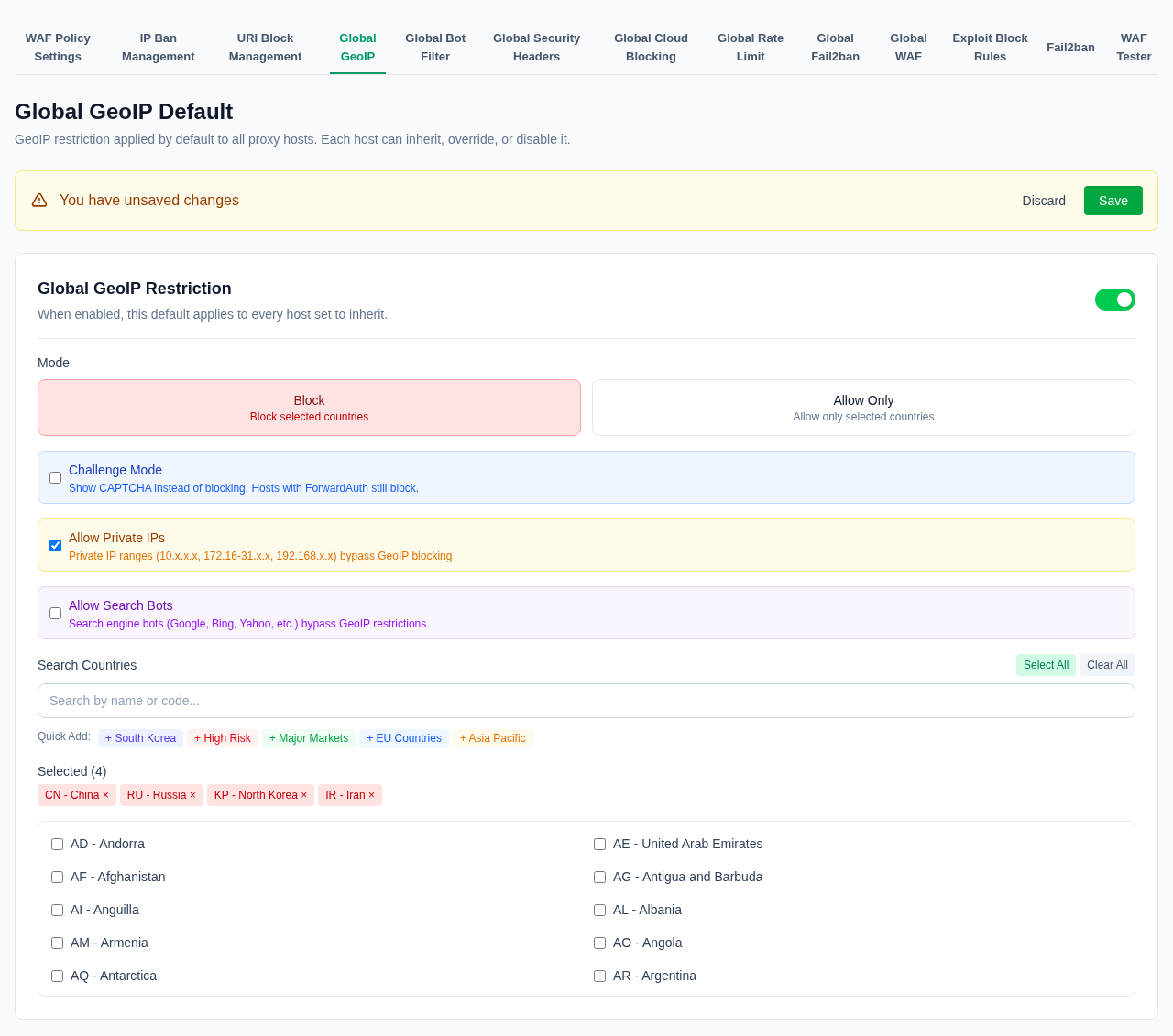
A new host's GeoIP restriction and cloud blocking start as Inherit; while the global defaults are off, nothing is blocked. Saving a global default regenerates every inheriting host.
GeoIP restriction settings
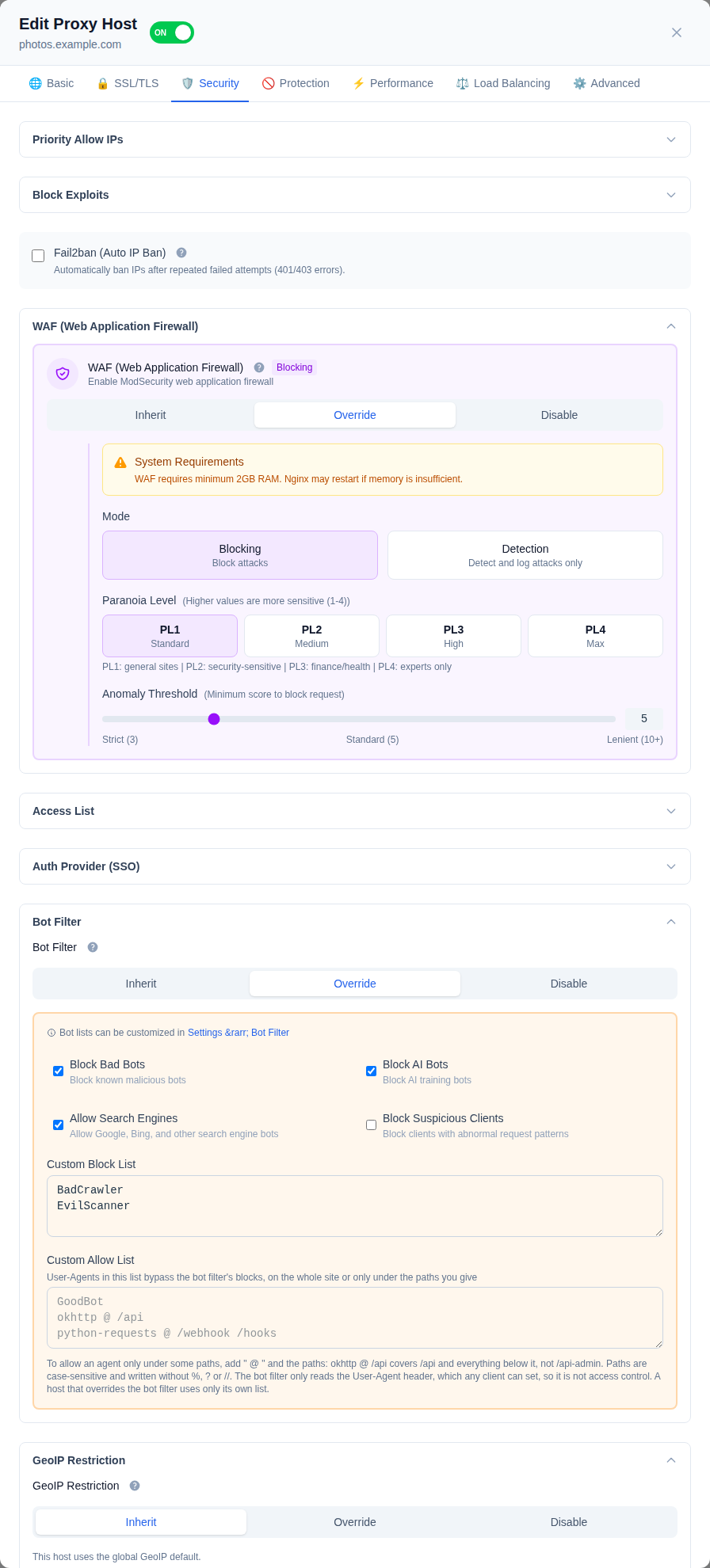
| Field | Meaning | Default |
|---|---|---|
| Mode | Block: blocks the selected countries. Allow Only: lets only the selected countries in. | Block |
| Countries | Picked with Search Countries and Quick Add (High Risk, Major Markets, EU Countries, Asia Pacific, South Korea). | none |
| Challenge Mode | Shows a CAPTCHA instead of blocking. | off |
| Allow Private IPs | Requests from private ranges (10.x, 172.16-31.x, 192.168.x) skip the country check. | on |
| Allow Search Bots | Requests with the User-Agent of a search engine bot such as Google or Bing skip the country restriction. | off |
IPs, ranges and domains in Priority Allow IPs (at the top of the Security tab, and also on the Global GeoIP page) skip the country restriction, cloud blocking and the bot filter. Use it for internal monitoring or for your own address when travelling.
Cloud provider blocking settings
| Field | Meaning | Default |
|---|---|---|
| Select Providers | The cloud providers to block. Quick Add selects Major Clouds, Budget VPS or Asian Clouds at once. | none |
| Challenge Mode | Shows a CAPTCHA instead of blocking. | off |
| Allow Search Bots | Requests with a search engine bot User-Agent skip cloud blocking. | off |
| Region | Providers |
|---|---|
| United States | Amazon Web Services, Microsoft Azure, Google Cloud, DigitalOcean, Linode (Akamai), Oracle Cloud, Vultr |
| Europe | Contabo, Hetzner, OVH, Scaleway |
| China | Alibaba Cloud, Tencent Cloud, Huawei Cloud |
| South Korea | Smileserv (CloudV/iwinv), Naver Cloud, KT Cloud |
The IP ranges are refreshed daily. AWS, Google Cloud and some others come from lists the providers publish; Azure and the European, Chinese and Korean providers are taken from the GeoIP ASN database by their ASNs, so GeoIP must be set up for them.
Legitimate users who connect through a VPN or a cloud-based service can be blocked too. If that is a concern, use challenge mode.
Challenge mode
In challenge mode the affected visitors are sent to a CAPTCHA page instead of being blocked. Passing it sets a cookie, and they are not asked again until the token expires.
- Under Settings → CAPTCHA, turn on Enable CAPTCHA Provider and choose a provider: Cloudflare Turnstile, Google reCAPTCHA v2 (Checkbox) or Google reCAPTCHA v3 (Score based).
- Enter the Site Key and Secret Key from the provider. For reCAPTCHA v3, set the Minimum Score (0.5 is the recommended value).
- If needed, change Token Validity (seconds) (86400 seconds = 24 hours by default) and the page title, theme and message.
- Turn on Challenge Mode in the GeoIP restriction or cloud blocking of a host (or of the global default).
Enabling the provider alone shows no CAPTCHA; challenge mode must also be on for the host or the global default. The CAPTCHA page shows the last 24 hours of total challenges, passed, failed and active tokens.
The challenge is decided after the WAF. A request that a blocking-mode WAF flags as an attack gets a 403 before it would see the challenge page.
Order and exemptions
The country and cloud checks are skipped for:
| Client | Geo blocking | Cloud blocking |
|---|---|---|
| Priority Allow IPs | skipped | skipped |
| Global trusted IPs (Settings → WAF Auto-Ban) | skipped | skipped |
| Private IPs (with Allow Private IPs on) | skipped | not applicable |
| Search bot User-Agents (with the feature's Allow Search Bots on) | skipped | skipped |
The /.well-known/acme-challenge/ path | skipped | skipped |
In block mode a blocked request gets a 403 and is logged with the block reason Geo Block or Cloud. How all the lists exempt clients from each other's controls is in Trusted IPs, exceptions and precedence.
Interaction with other features
- ForwardAuth: nginx allows only one authentication subrequest per location. In the host edit dialog, turning challenge mode on clears the Auth Provider, and choosing an Auth Provider disables challenge mode. A host with ForwardAuth that inherits a challenge from the global default blocks instead of challenging.
- Access lists with usernames and passwords: on hosts that use such a list, challenge mode blocks instead.
- Cloudflare and other proxies in front: behind a proxy every request appears to come from the proxy, so countries come out wrong. Set Settings → Trusted Proxies first. See Running behind Cloudflare.
Limits
- Country decisions are only as accurate as the GeoLite2 data. Without automatic updates, changed address assignments are not picked up.
- Allow Search Bots goes by the User-Agent header, which any client can set; a request posing as a search bot passes too.
- Redirect hosts and TCP/UDP stream hosts cannot use geo or cloud blocking.