
Features
TCP/UDP streams
A stream host forwards TCP or UDP connections that are not HTTP, such as a database, a game server, SSH or DNS, to an internal server. It uses the nginx stream module, and its configuration file is kept apart from the HTTP hosts. Connections arrive on a port of the server, not on a domain.
Where to create one
Go to Proxy Hosts → Add Proxy Host → Basic tab → Proxy Mode and choose TCP / UDP Stream. The edit dialog of a stream host has only the Basic and Advanced tabs.
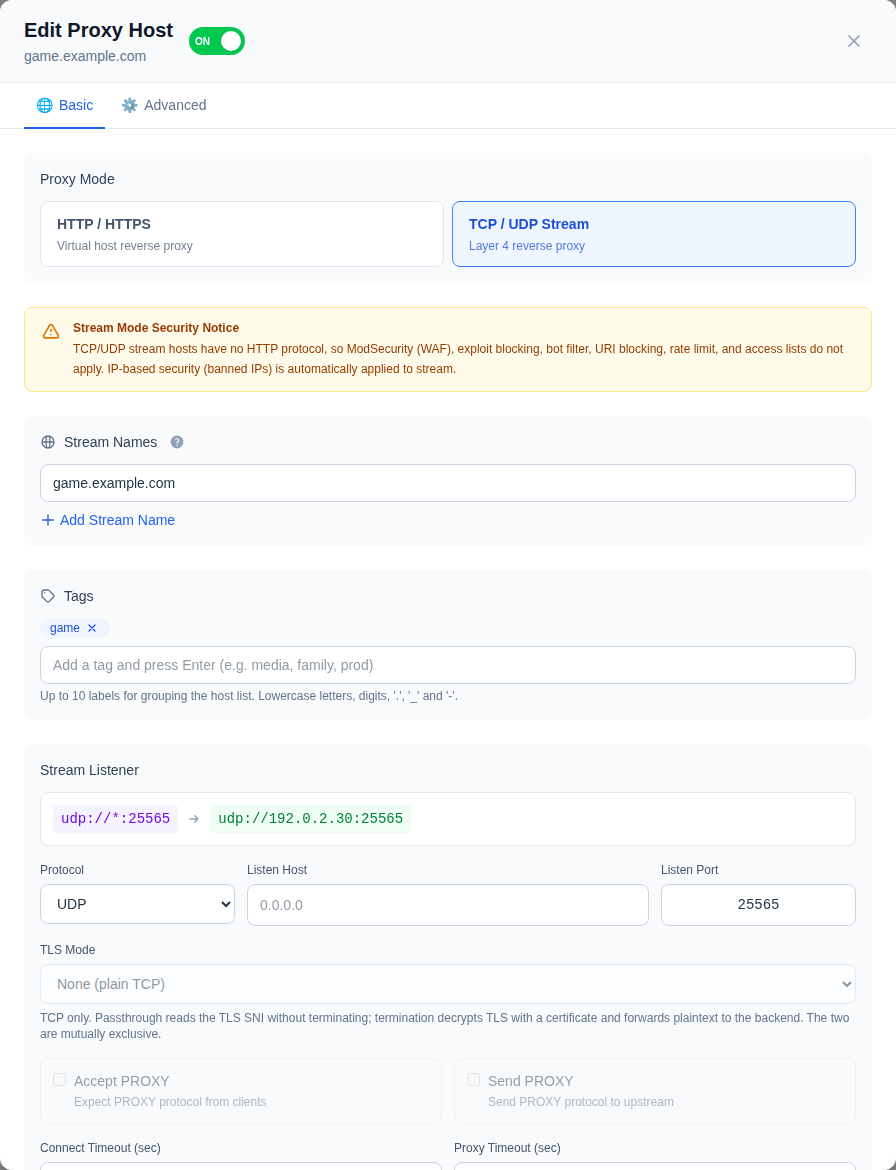
Settings
| Field | Meaning | Default |
|---|---|---|
| Stream Names | Names that identify the host in the list: a domain such as service.example.com or a short label. Letters, digits, *, _, . and - only. With TLS passthrough they become nginx's server_name. | none |
| Protocol | tcp or udp | tcp |
| Listen Host | The address of this server to accept connections on. Empty or * means every address. Only local IP addresses are allowed; backend hostnames go in Backend Host. | every address |
| Listen Port | The port to accept connections on (1-65535) | none |
| TLS Mode | See the table below. TCP only. | None (plain TCP) |
| Accept PROXY | Expects a PROXY protocol header from whatever is in front (a load balancer, for example). TCP only. | off |
| Send PROXY | Sends a PROXY protocol header to the backend so it learns the original client address. TCP only. | off |
| Connect Timeout (sec) | How long to wait for the connection to the backend. Empty uses the nginx default. | nginx default |
| Proxy Timeout (sec) | How long a connection may stay without data passing before it is closed. Empty uses the nginx default. | nginx default |
| Backend Host | IP, hostname or container name of the internal server. The Docker button lets you pick a container. | none |
| Backend Port | The port of the internal server | none |
TLS modes
| Mode | Behaviour |
|---|---|
| None (plain TCP) | Bytes are passed to the backend as received. |
| TLS passthrough (ssl_preread) | TLS is passed to the backend without being decrypted. NPG reads only the SNI from the handshake; the backend holds the certificate. |
| TLS termination (certificate) | NPG decrypts TLS with the certificate you choose and passes plaintext to the backend. Issue or upload the certificate first under SSL certificates. |
Passthrough and termination cannot be combined. Choosing UDP turns off TLS mode, Accept PROXY and Send PROXY and locks them. If the certificate chosen for termination has no files yet (still pending, for example), the configuration is generated without TLS until the certificate is ready.
Advanced tab
Directives on the Advanced tab are placed as they are inside this stream host's server block. Stream directives can affect other interfaces and ports, so it is safer to leave this to administrators.
Opening the port
The nginx container runs in host network mode, so saving a stream host opens its port on the server directly. No Docker port mapping is needed. To accept connections from outside, open the TCP or UDP port in the server firewall and on your router.
- Only one enabled stream host can use a given combination of listen host, listen port and protocol. A save that overlaps is refused.
- Do not pick a port the HTTP hosts use, such as 80 or 443, or a port another program on the server already uses.
Logs
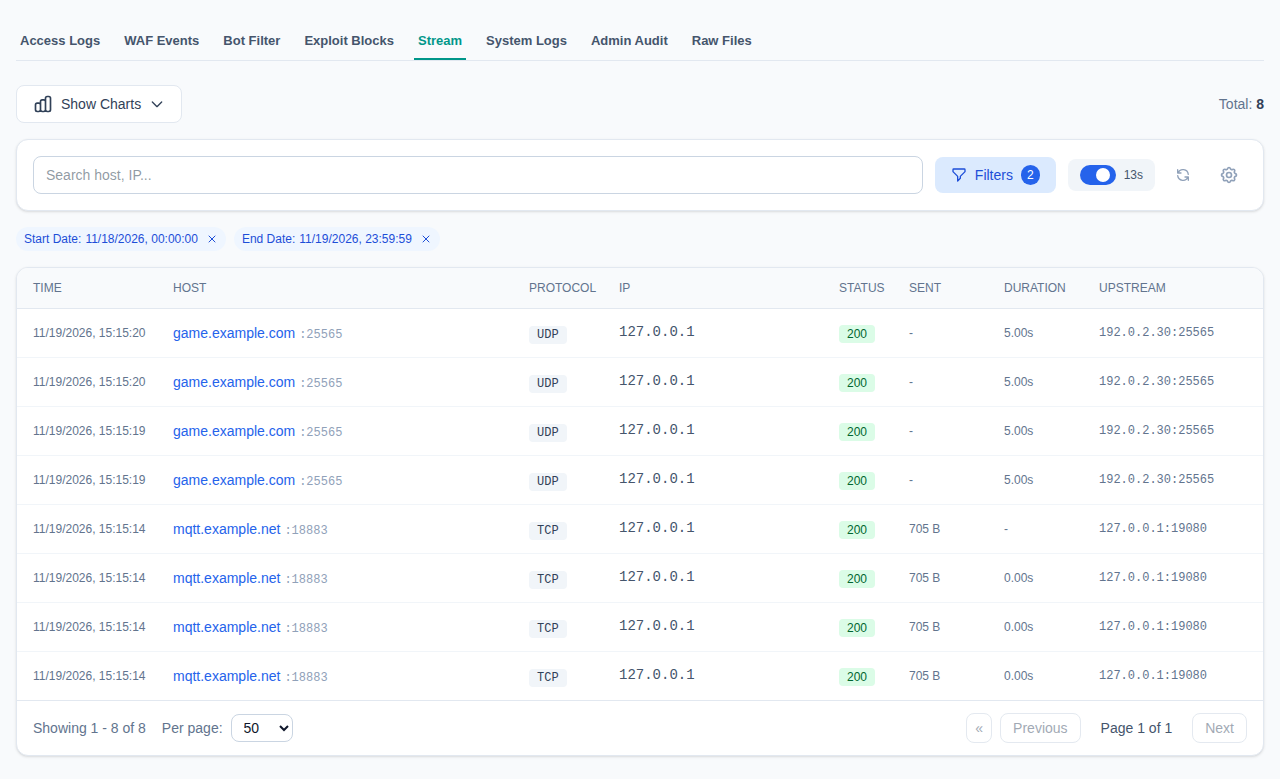
Each connection of a stream host is logged as one line per session and appears under Logs → Stream. The tab shows time, host and port, protocol (TCP/UDP), client IP, status, bytes sent, duration and backend; click a row for the detail view.
| Status | Meaning |
|---|---|
| 200 | Session completed |
| 400 | Bad client data (for example a PROXY protocol header) |
| 403 | Refused by access rules or an IP ban |
| 500 | nginx internal error |
| 502 | Could not reach the backend |
| 503 | Unavailable (for example a connection limit) |
- The raw log is written to
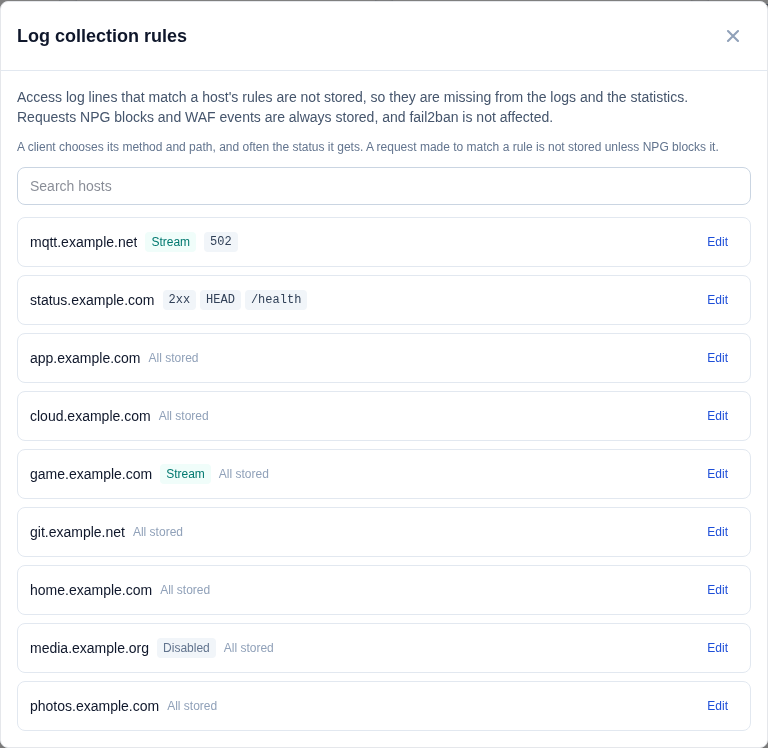
/etc/nginx/logs/stream_raw.log, in the same folder as the access log, and follows the same retention and rotation. It is also listed under Logs → Raw Files. - For a busy host such as a UDP service, you can stop storing sessions under Logs → Access Logs → Collection rules. Stream hosts offer only "Don't store this host's sessions" and status code rules (a session has no method or path).
Interaction with other features
TCP/UDP streams carry no HTTP, so the HTTP-level protections do not apply.
| Feature | Stream hosts |
|---|---|
| WAF, Block Exploits, bot filter, URI blocking, rate limit, access lists | not applied |
| GeoIP restriction, cloud provider blocking | no settings for them |
| Fail2ban, WAF auto-ban | stream sessions are not counted |
| Traffic page, dashboard statistics | not included yet |
If a stream port should be open to certain addresses only, restrict it in the server firewall.
Limits
- The stream host dialog has no Load Balancing tab, so a stream host has one backend.
- UDP supports neither TLS termination, TLS passthrough nor the PROXY protocol.
- HTTP and stream listeners share nginx's
worker_connections. With many long-lived stream connections, raise the value on the Worker tab of Settings → Global Settings. - Bytes received (
$bytes_received) are not stored; the log shows bytes sent only.