
Features
Global security defaults
With many hosts, the same security settings end up repeated on every host. Global security defaults let you set the values of six security features in one place; each proxy host then chooses to Inherit them, Override them with its own values, or Disable the feature. Saving a global default regenerates the nginx configuration of every host that inherits it.
Features covered
| Feature | Global default (WAF / Blocking →) | Per host (Proxy host → edit) | New host starts on |
|---|---|---|---|
| WAF | Global WAF | Security tab → WAF (Web Application Firewall) | Disable |
| GeoIP restriction | Global GeoIP | Security tab → GeoIP Restriction | Inherit |
| Bot filter | Global Bot Filter | Security tab → Bot Filter | Inherit |
| Cloud blocking | Global Cloud Blocking | Security tab → Cloud Provider Blocking | Inherit |
| Security headers | Global Security Headers | Protection tab → Security Headers | Inherit |
| Rate limit | Global Rate Limit | Protection tab → Rate Limit | Inherit |
All six global defaults start switched off (cloud blocking starts with no provider selected). Right after installation, hosts that inherit therefore get nothing from them.
The three states
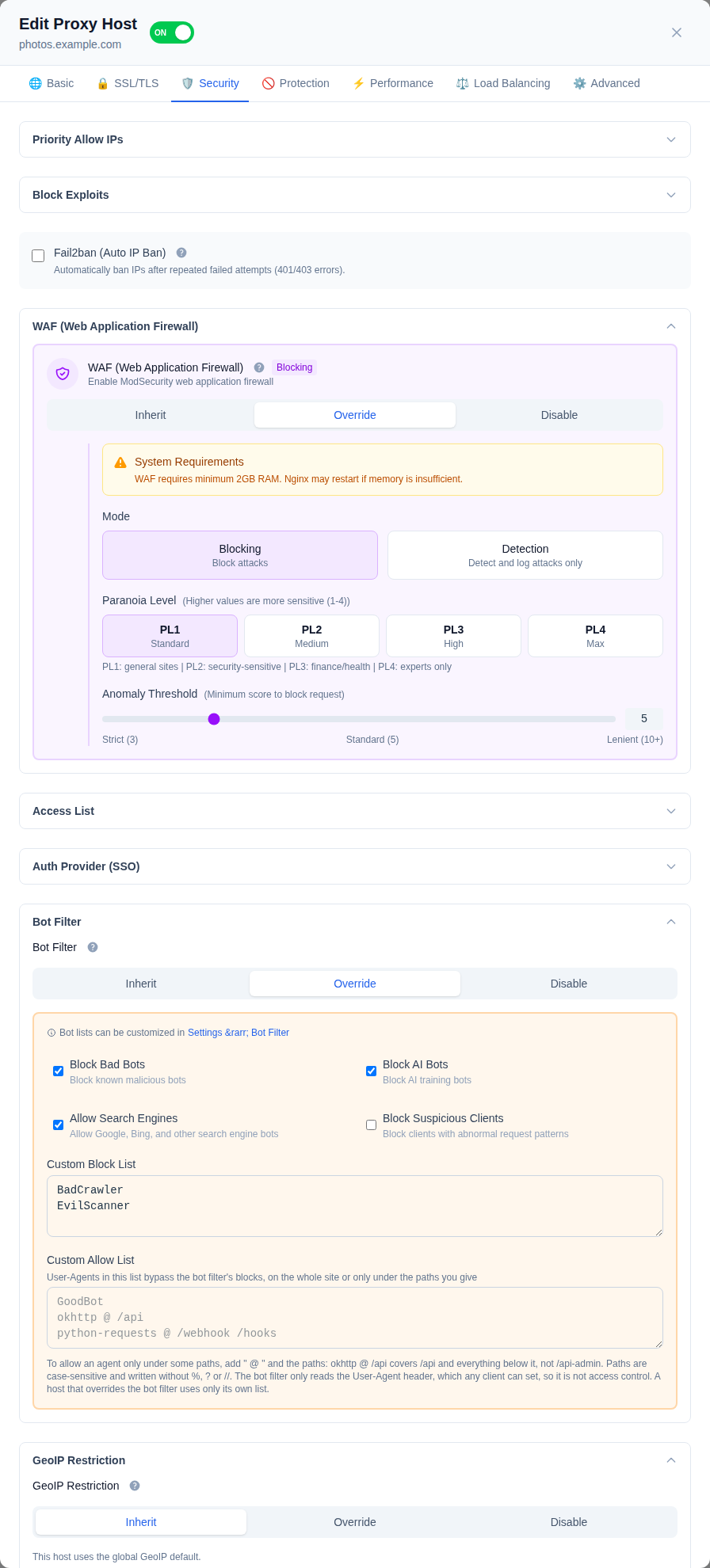
Above each feature in the host editor there is an Inherit / Override / Disable selector.
| State | Effect |
|---|---|
| Inherit | The host uses the global default. If the global default is off, nothing is applied to this host either. |
| Override | The host uses only the values entered on the host. The global default is ignored. |
| Disable | The feature is not applied to this host, even if the global default is on. |
Setting a global default
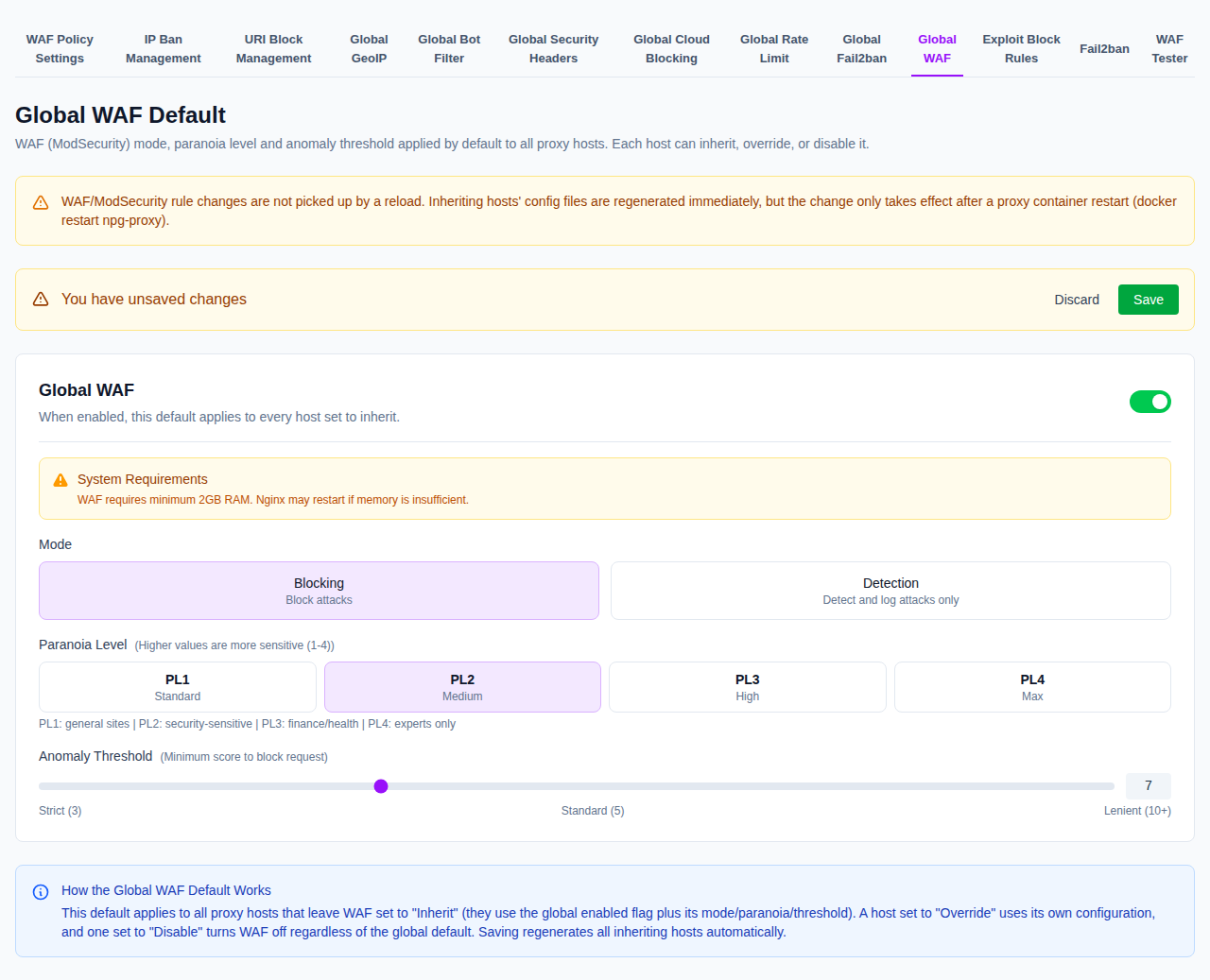
- Open the global tab under WAF / Blocking.
- Turn on the feature toggle (for example Global WAF) and enter the values.
- When "You have unsaved changes" appears at the top, click Save. Discard reverts the edits.
- Saving regenerates the configuration of every inheriting host and applies it once
nginx -tpasses.
Notes per feature:
- Global WAF: inheriting hosts use the global on/off state together with its Mode (Blocking or Detection), Paranoia Level and Anomaly Threshold. The global WAF starts with Detection mode, paranoia level 1 and threshold 5. New hosts start with WAF on Disable, so to use the global WAF on a host, choose Inherit there. See WAF.
- Global GeoIP: requires MaxMind to be set up first in Settings → GeoIP. Country lists and challenge mode are covered in Geo and cloud blocking.
- Global Cloud Blocking: there is no separate on/off toggle. Selecting at least one provider applies it to inheriting hosts. A host that selects its own providers overrides with that list.
- Global Bot Filter: block categories and allowed/blocked User-Agent lists are covered in Bot filter.
- Global Security Headers, Global Rate Limit: the fields are described in Security headers and rate limits. An inherited rate limit keeps a separate counter per host; only the values are shared.
How it works with other features
The following settings carry "global" in their names but do not use the inherit/override/disable model.
- WAF / Blocking → Global Fail2ban: a separate jail that counts requests that belong to no proxy host (requests to the bare IP address, unknown domain names). It is described with the per-host Fail2ban in Automatic bans.
- Settings → WAF Auto-Ban → Global Trusted IPs: addresses that skip geo restriction, access lists, the bot filter and rate limits on every host and are never banned automatically. See Trusted IPs, exceptions and precedence.
- WAF / Blocking → WAF Policy Settings: WAF rules disabled for all hosts at once. See WAF and When the WAF blocks legitimate requests.
Changing a global default requires write permission on the WAF / Blocking area. Global defaults are included in backups.
Limits
- A host on Inherit cannot change individual values of that feature. To change one value, switch the host to Override and set all values on that host.
- With many inheriting hosts, saving a global default regenerates that many configuration files, so the save can take a while to finish.