
Features
Automatic bans
When one IP keeps producing failed responses or WAF events within a short time, NPG bans it automatically. Banned IPs are listed, and can be released, in one place. This page covers the automatic ban mechanisms together with URI blocks, which close off paths, and the exploit block rules, which stop known attack patterns.
At a glance
| Mechanism | What it counts or blocks | Ban scope | Screen |
|---|---|---|---|
| Per-host Fail2ban | Failed responses a host returns (401 and 403 by default) | that host | WAF / Blocking → Fail2ban |
| Global Fail2ban | Failed responses to requests that matched no host (direct-IP access, unknown hostnames; 400 and 444 by default) | every host | WAF / Blocking → Global Fail2ban |
| WAF auto-ban | Rule events of blocking-mode WAFs | every host | Settings → WAF Auto-Ban |
| Manual bans | IPs you add | the chosen host, or every host | WAF / Blocking → IP Ban Management |
| URI blocks | Requests to the paths you list | the host with the rule, or every host | WAF / Blocking → URI Block Management |
| Exploit block rules | Patterns such as SQL injection, XSS, path traversal and scanners | hosts with Block Exploits on | WAF / Blocking → Exploit Block Rules |
Addresses that are never banned
These addresses are never banned automatically:
- loopback addresses (127.0.0.1 and the like)
- addresses in Settings → Trusted Proxies, because banning a proxy would ban every visitor behind it
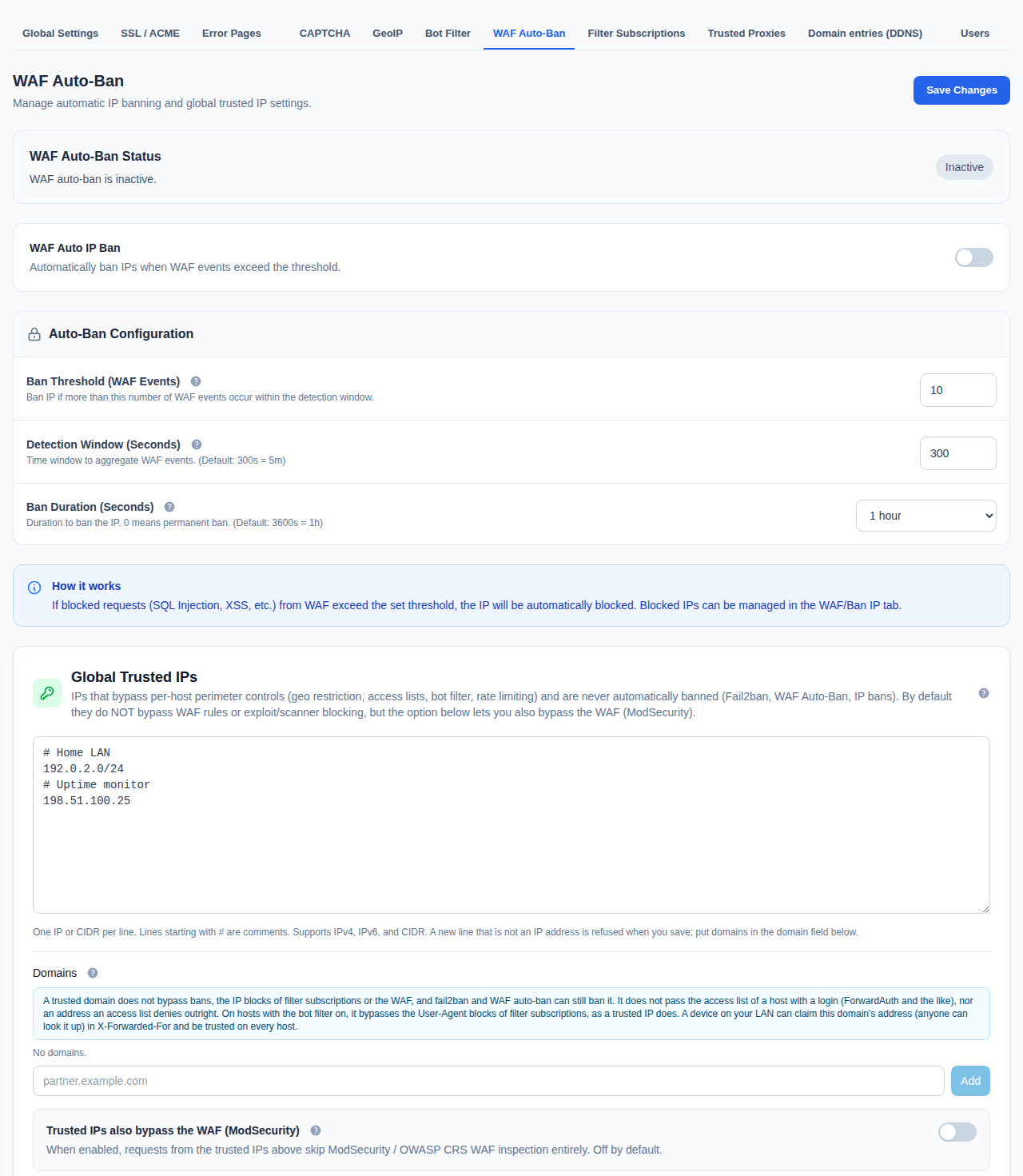
- the Global Trusted IPs under Settings → WAF Auto-Ban. They are left out of Fail2ban and WAF auto-ban, and bans already in place are dropped from the nginx configuration.
With Never ban local network addresses on in the global Fail2ban, Fail2ban also does not ban private ranges (10.x, 172.16–31.x, 192.168.x, fc00::/7) and link-local addresses (they are still counted). The setting applies to the per-host Fail2ban as well, but not to WAF auto-ban.
If you run behind a proxy such as Cloudflare, set Settings → Trusted Proxies first. Without it every request appears to come from the proxy. See Running behind Cloudflare.
Per-host Fail2ban
Turning on Fail2ban (Auto IP Ban) under the proxy host's edit dialog → Security tab saves at once (it is shown on saved hosts only). Change the details under WAF / Blocking → Fail2ban by clicking Configure on the host.
| Field | Meaning | Default |
|---|---|---|
| Max Retries | Failures allowed before a ban | 5 |
| Find Time (sec) | The window in which failures are counted | 600 |
| Ban Duration | How long the ban lasts. 0 seconds is a permanent ban. | 3600 seconds |
| Fail Codes | HTTP status codes counted as failures, comma-separated | 401,403 |
| Action | Block IP, Log Only (no ban, written to the API log), Notify Only (no ban, sends a notification) | Block IP |
The per-host Fail2ban counts only responses the host itself returns. Responses that belong to no host, such as the 444 sent to direct-IP requests, cannot be counted there; that traffic is handled by the global Fail2ban.
Global Fail2ban
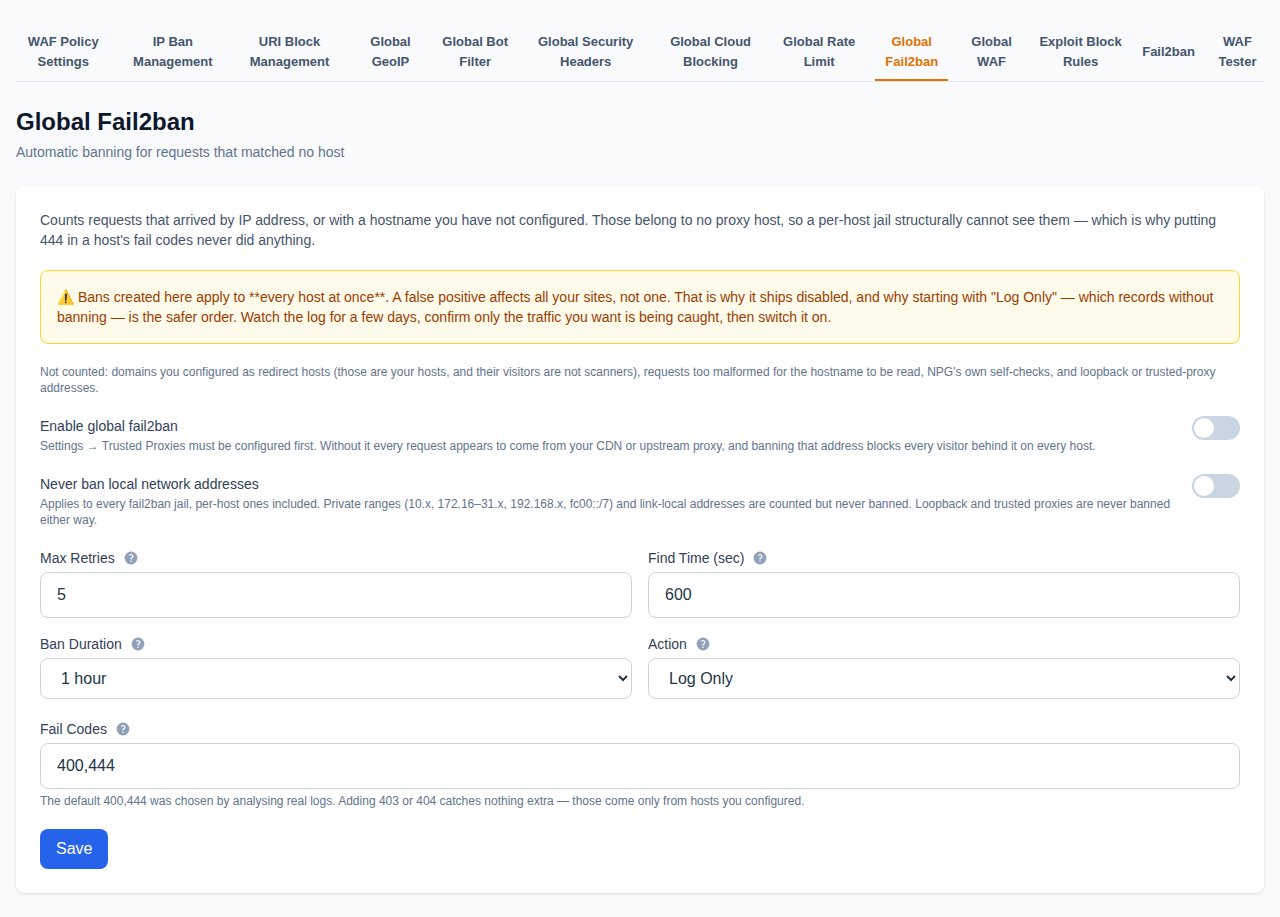
WAF / Blocking → Global Fail2ban counts requests that arrive by IP address or with a hostname you have not configured. Its bans apply to every host at once, so a false positive affects all your sites.
| Field | Default |
|---|---|
| Enable global fail2ban | off |
| Max Retries | 5 |
| Find Time (sec) | 600 |
| Ban Duration | 3600 seconds |
| Fail Codes | 400,444 |
| Action | Log Only |
| Never ban local network addresses | off |
- Set Settings → Trusted Proxies before turning it on. While Trusted Proxies is empty, the global Fail2ban does nothing.
- Start with Log Only for a few days, then switch to Block IP.
- Not counted: domains configured as redirect hosts, requests too malformed for the hostname to be read, NPG's own self-checks, and loopback and trusted-proxy addresses.
- 403 and 404 come only from hosts you configured, so adding them to the fail codes here catches nothing extra.
WAF auto-ban
Turn it on under Settings → WAF Auto-Ban. When one IP's WAF events reach the threshold within the window, that IP is banned on every host.
| Field | Meaning | Default |
|---|---|---|
| WAF Auto IP Ban | Turns the feature on | off |
| Ban Threshold (WAF Events) | Ban after this many events | 10 |
| Detection Window (Seconds) | The window in which events are counted | 300 |
| Ban Duration (Seconds) | How long the ban lasts. 0 is permanent. | 3600 |
- Only events from hosts in blocking mode are counted. Detection mode logs and never bans.
- Events of disabled WAF rules (rule exclusions) and events from global trusted IPs are not counted.
- If legitimate requests trip the WAF and end in bans, narrow down and disable the rule responsible as described in When the WAF blocks legitimate requests.
On the same screen, Global Trusted IPs takes one IP or CIDR per line (lines starting with # are comments); domains go in the domain field below. With Trusted IPs also bypass the WAF (ModSecurity) on, their requests also skip WAF inspection (off by default). What the global trusted IPs exempt from is listed in Trusted IPs, exceptions and precedence.
IP Ban Management
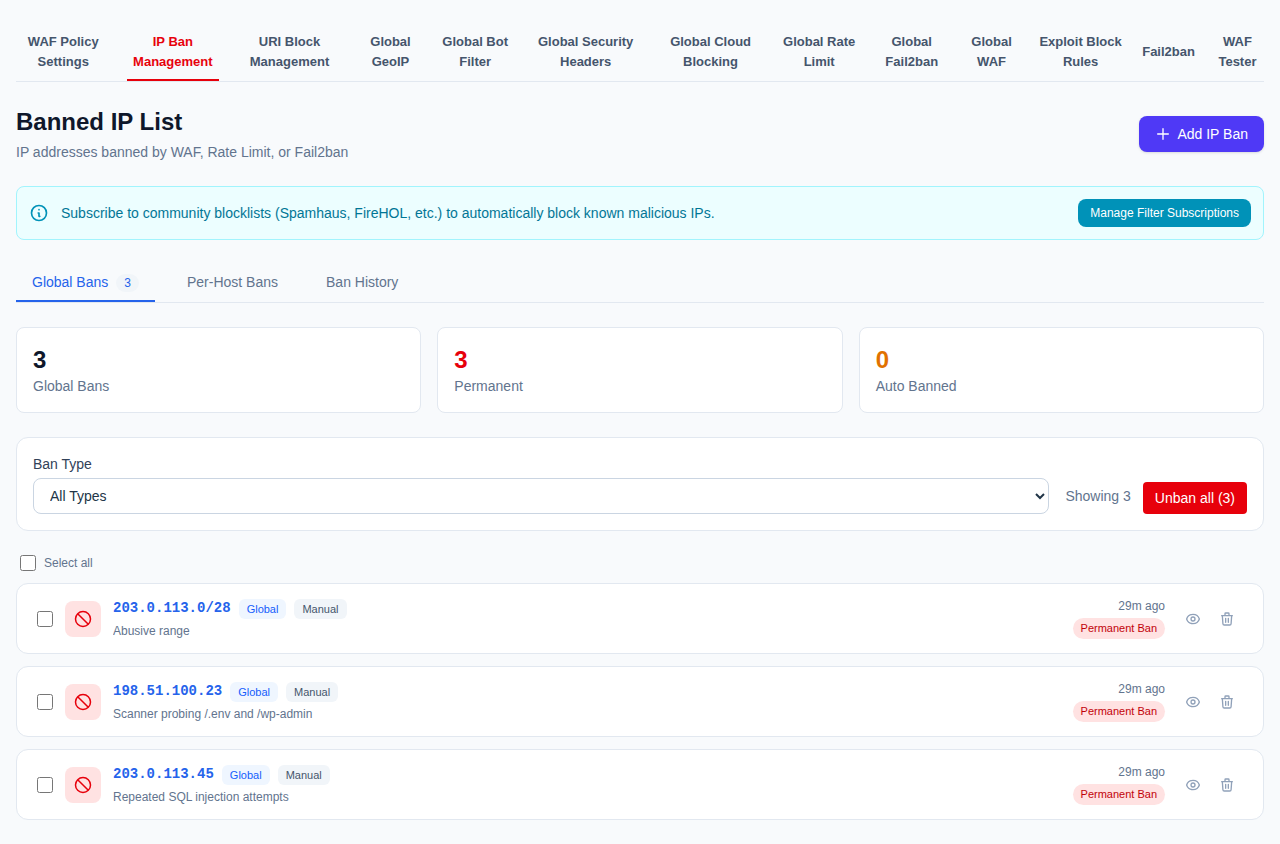
WAF / Blocking → IP Ban Management lists the IPs banned by Fail2ban, WAF auto-ban and by hand.
| Tab | Contents |
|---|---|
| Global Bans | Bans that apply to every host |
| Per-Host Bans | Bans that apply to one host; can be filtered by host |
| Ban History | Ban and unban records (with sources such as manual, expired or WAF auto-ban) and frequently banned IPs |
- Filter by ban type (auto, manual, WAF, Fail2ban) and see the time remaining and the expiry. With GeoIP on, each address shows its country.
- Add IP Ban bans an address by hand: choose Apply to Host (one host or Global Ban (All Hosts)), the duration (5 minutes, 10 minutes, 30 minutes, 1 hour, 24 hours, 7 days, 30 days, Permanent Ban) and a reason.
- Change duration on a ban sets a new duration counted from now, or makes it permanent.
- Unban, unban selected, and unban all in the current filter are available. Unbanning all cannot be undone.
- Opening an address shows its activity: recent requests, blocked requests, times banned, and the hosts and paths it targeted most.
A banned IP gets a 403 and is logged with the block reason Banned IP. If you have set up a notification channel, Fail2ban and WAF auto-ban bans can send the "IP banned" notification, grouped every five minutes (Notifications).
URI blocks
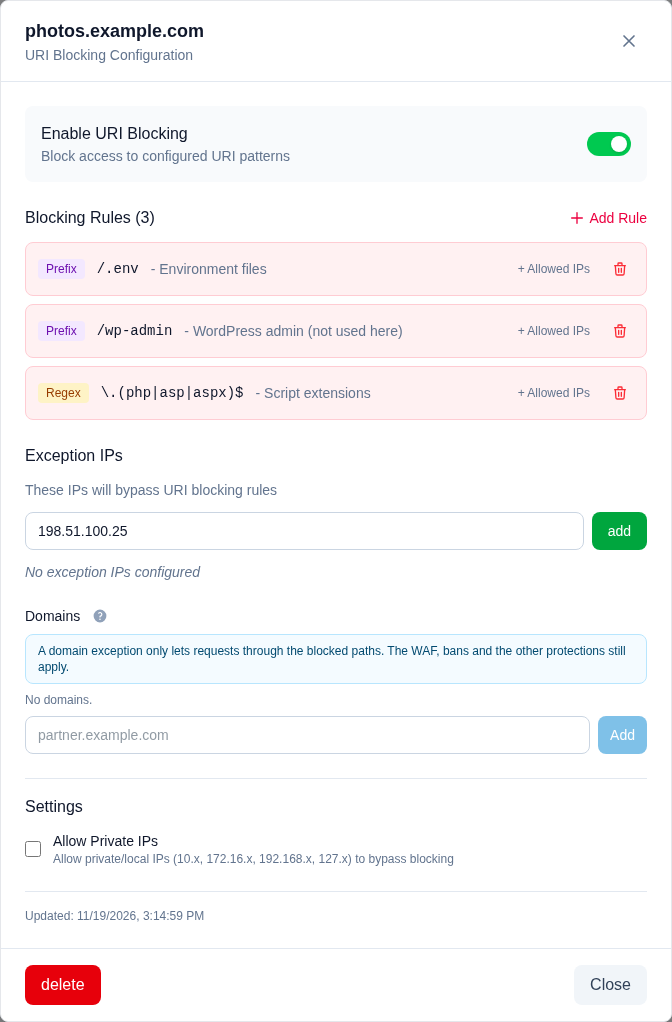
WAF / Blocking → URI Block Management blocks requests by path. Use it to cut off requests for paths you do not serve, such as /wp-admin or /.env, before they reach the backend.
| Tab | Contents |
|---|---|
| Global Rules | Rules that apply to every proxy host, checked before the per-host rules |
| Per-Host Rules | Add Host picks a host and holds its rules; Enable URI Blocking turns them on or off per host |
| History | Records of rules added and removed, and of hosts enabled and disabled |
| Field | Meaning |
|---|---|
| URI Pattern | The path to block, for example /wp-admin, /xmlrpc.php, \.php$ |
| Match Type | Exact, Prefix (every path that starts with the pattern), Regex |
| Description | A note (optional) |
| Quick Templates | Block WP Admin, Block XML-RPC, Block WP Login, Block PHP, Block .env |
| Exception IPs | IPs that bypass every rule of this host (or of the global rules) |
| Allow Private IPs | Private ranges (10.x, 172.16–31.x, 192.168.x) bypass the blocks. |
| Allowed IPs for this rule | IPs or CIDR ranges that only this rule lets through (+ Allowed IPs on each rule), for example to open the login path to the office IP only |
Exception IPs can also take domains (DDNS names). A blocked request gets a 403 and is logged with the block reason URI Block. Access lists and global trusted IPs are not exceptions to URI blocks; put the addresses to let through in the exception IPs.
Exploit block rules
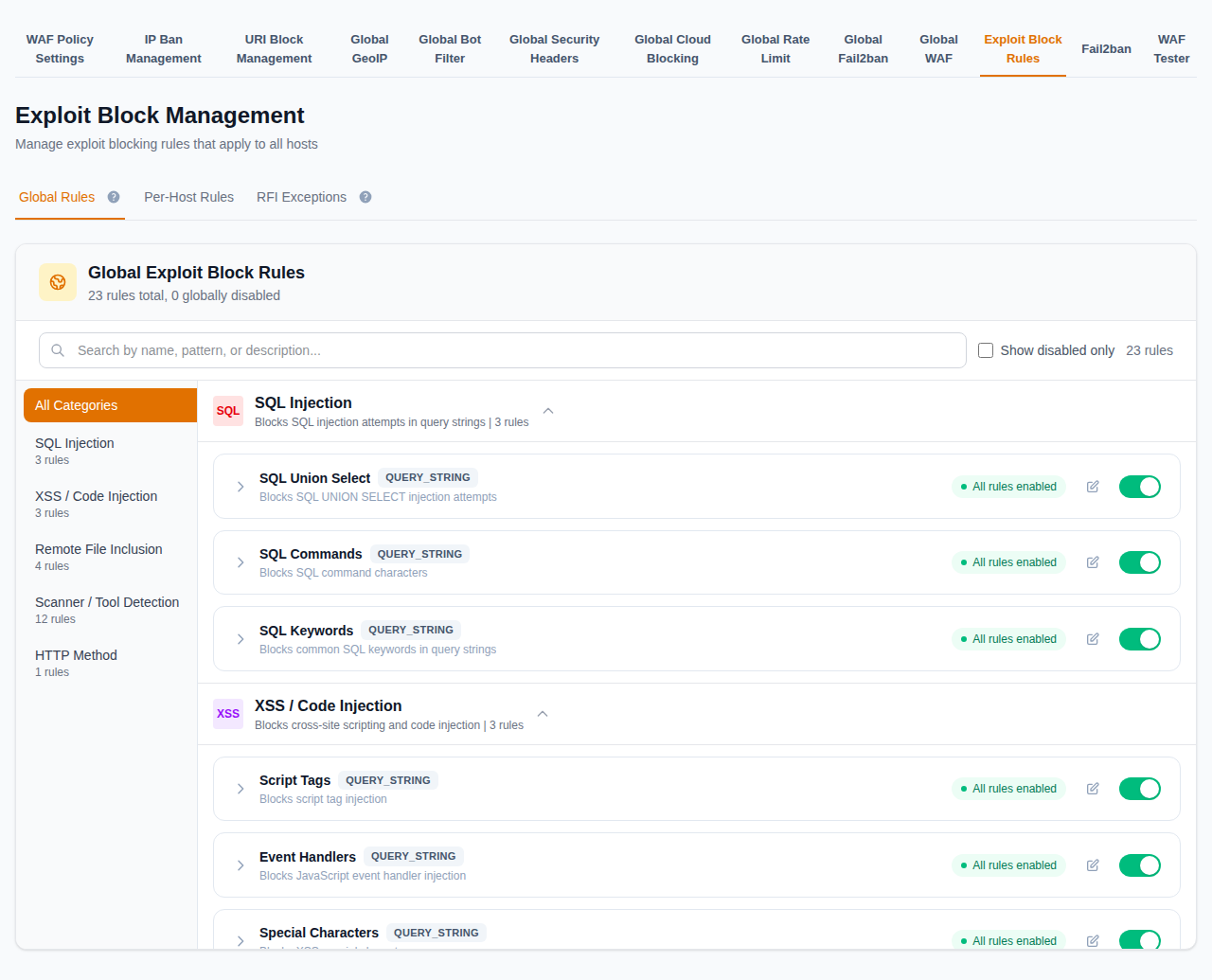
Block Exploits on a proxy host's Security tab blocks known attack patterns in nginx. New hosts start with it on. The rules are managed under WAF / Blocking → Exploit Block Rules.
| Tab | Contents |
|---|---|
| Global Rules | The rules by category; disable a rule on every host or edit its pattern. |
| Per-Host Rules | Disable or enable rules for each host that has exploit blocking on. |
| RFI Exceptions | Patterns that skip exploit blocking, such as for remote file inclusion (RFI). Global and per-host exceptions are merged. |
The categories are SQL Injection, XSS / Code Injection, Remote File Inclusion, Path Traversal, Scanner / Tool Detection, HTTP Method and Custom Rules. Each rule shows where its pattern applies (Query String, Request URI, User Agent, Request Method), and the pattern editor can test the pattern against sample input.
A blocked request gets a 403 and appears under Logs → Exploit Blocks with the rule name. Exploit blocking is separate from the WAF, so WAF rule exclusions and the "Trusted IPs also bypass the WAF" option do not affect it.
Limits
- TCP/UDP stream sessions are not counted by Fail2ban or WAF auto-ban.
- Redirect hosts cannot use URI blocks; their only exploit protection is the redirect host's Block Exploits option.
- Fail2ban counters are kept in Valkey when it is available, otherwise in the API process's memory. Counters kept in memory are lost when the API restarts.