
Features
Notifications
NPG sends events that affect operation (failed certificate renewals, failed nginx reloads, IP bans, low disk space and others) and a daily summary to external channels. There are three channel types, Discord, Telegram and Webhook; the webhook reaches receivers such as ntfy, Gotify, Apprise and Home Assistant.
Notifications are designed to stay quiet. An ongoing failure is announced when it starts and when it recovers, not in between, and bursts such as IP bans are coalesced into one message per five minutes.
Where it is
Settings → Notifications, in the Operations group of the settings tabs. It is shown to roles with the Settings permission area.
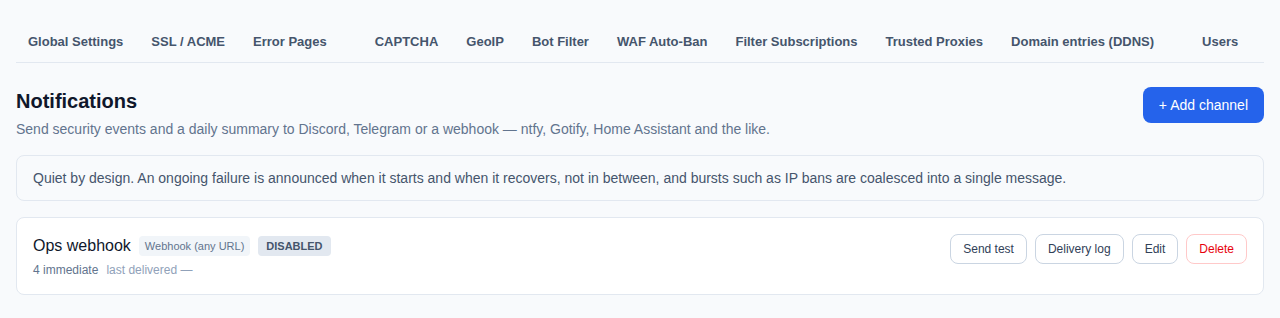
Adding a channel
- Click Settings → Notifications → Add channel.
- Enter a Name, choose the Type and fill in the connection details for that type (table below).
- Under What to send, choose Off, Immediate or Summary only for each alert.
- To receive a daily summary, turn on Send a daily summary and set the hour.
- Save, then click Send test on the channel and check that the message arrives.
| Type | Fields | What to prepare |
|---|---|---|
| Discord | Discord webhook URL | In the Discord channel: Edit Channel → Integrations → Webhooks → New Webhook, then Copy Webhook URL. The URL itself is the credential. |
| Telegram | Bot token, Chat ID | Send /newbot to @BotFather to get a bot token. A bot cannot message you first: send your bot a message, add it to a group and post there, or add it as a channel admin and post once. Then click Detect chat id and pick the conversation. |
| Webhook (any URL) | Receiver URL, Authorization header (only if needed), Body format | Create a receiving address on your receiver. For receivers whose URL carries the topic, like ntfy, choose Plain text (ntfy); for Gotify, Apprise, Home Assistant and your own receivers choose JSON. |
An example webhook for ntfy:
| Field | Value |
|---|---|
| Receiver URL | https://ntfy.example.com/npg-alerts |
| Authorization header | Bearer tk_example_token (only if the server requires it) |
| Body format | Plain text (ntfy) |
Common settings
| Field | Description |
|---|---|
| Use this channel | Off sends nothing to this channel. |
| Send a daily summary, Send at | Sends a summary once a day. The hour is in the server's time zone, which follows TZ in the Docker Compose file. |
| Message language | The language of alerts on this channel (Korean, English), independent of the panel language. |
| Use the platform's own formatting | Discord gets an embed, Telegram MarkdownV2. For webhooks it only affects the human-readable text line. |
| Dashboard address | A link appended to the daily summary. Use the admin panel address the people reading this channel actually use. |
| Message format (optional) | Empty uses the default format. The placeholders below are available. |
Placeholders for the message format:
{{event}} {{time}} {{host}} {{ip}} {{country}} {{reason}} {{count}} {{detail}}
{{instance}} {{subject}} {{free}} {{growth_per_day}} {{days_to_full}} {{roles}} {{action}}
Request headers, cookies, the User-Agent, the request URL and raw log data are not available as placeholders, because they can carry credentials.
Available alerts
| Alert | Sent when |
|---|---|
| Certificate renewal failed | A Let's Encrypt renewal failed |
| Certificate renewed | Only when a renewal that had been failing works again |
| DDNS update failed | The public IP changed but DNS was not updated |
| DDNS updating again | Only when a failing DDNS record works again |
| Scheduled backup failed | The scheduled backup ran and failed |
| nginx reload failed | Applying the configuration failed through every retry. nginx keeps running the previous configuration. |
| Admin sign-in locked out | Failed sign-ins reached the lockout. Coalesced per five minutes. |
| IP banned | fail2ban or WAF auto-ban blocked an address. Coalesced per five minutes. |
| IP detected (not banned) | A fail2ban rule set to Notify Only reached its threshold. Coalesced per five minutes. |
| SSO sign-in refused | An identity outside the allowlist tried to sign in through SSO |
| Disk space running low | A disk NPG writes to passed the warning line (85% by default); sent once |
| Disk space critical | It passed the critical line (90% by default). On the database disk, older log chunks are compressed right away to win space back. |
| Disk space back to normal | Only when a disk that was low drops below the recovery line (80% by default) |
| Domain entry needs review | A domain in an access list changed in a way that needs confirmation, such as a new CNAME target |
| Domain entry change not applied | nginx did not accept a change of domain entries |
The disk warning, critical and recovery lines can be changed with environment variables; see the disk entries in Environment variables.
Testing and delivery log
- Send test sends a test message to check the connection.
- Send now on an alert and Preview the summary (send now) send a real message right away. They use the saved settings, so save first to see your changes.
- Delivery log shows each channel's delivery results and attempts.
- When deliveries fail in a row, the channel shows the count of failures, and at 10 the channel turns itself off.
Limits
- The channel types are Discord, Telegram and Webhook. There is no email channel.
- NPG does not send ordinary requests or individual access log lines as notifications.