
Guides
Running behind Cloudflare
By the end of this page NPG uses the visitor's real address for country blocking, Fail2ban, access lists and rate limits on domains proxied by Cloudflare (orange cloud), and the connection between Cloudflare and NPG uses HTTPS.
If you use Cloudflare Tunnel, read Publishing through Cloudflare Tunnel instead. A tunnel already delivers the real address correctly.
Before you start
- The domain's DNS is on Cloudflare, and the proxy host's record is proxied (orange cloud).
- NPG has a proxy host for the domain. (Your first proxy host)
Why this needs setting up
With the Cloudflare proxy on, the party connecting to NPG is a Cloudflare server, not the visitor. Without trusted proxies, NPG judges the Cloudflare server's address as if it were the visitor.
- Country blocking works on the country of the Cloudflare server, so visitors from allowed countries can be blocked.
- If Fail2ban or WAF Auto-Ban bans a Cloudflare server's address, every visitor coming through that server is blocked.
- Access lists, banned IPs and rate limits all work on Cloudflare's addresses.
1. Set up trusted proxies
- Open Settings → Trusted Proxies.
- Under Preset, choose Behind Cloudflare proxy (orange cloud). This adds Cloudflare's published ranges in one step. Any range Cloudflare has added since can go in Custom entries.
- Leave Real IP header at the default,
X-Forwarded-For. - Click Save. "Saved. Applying to the nginx configuration." appears.
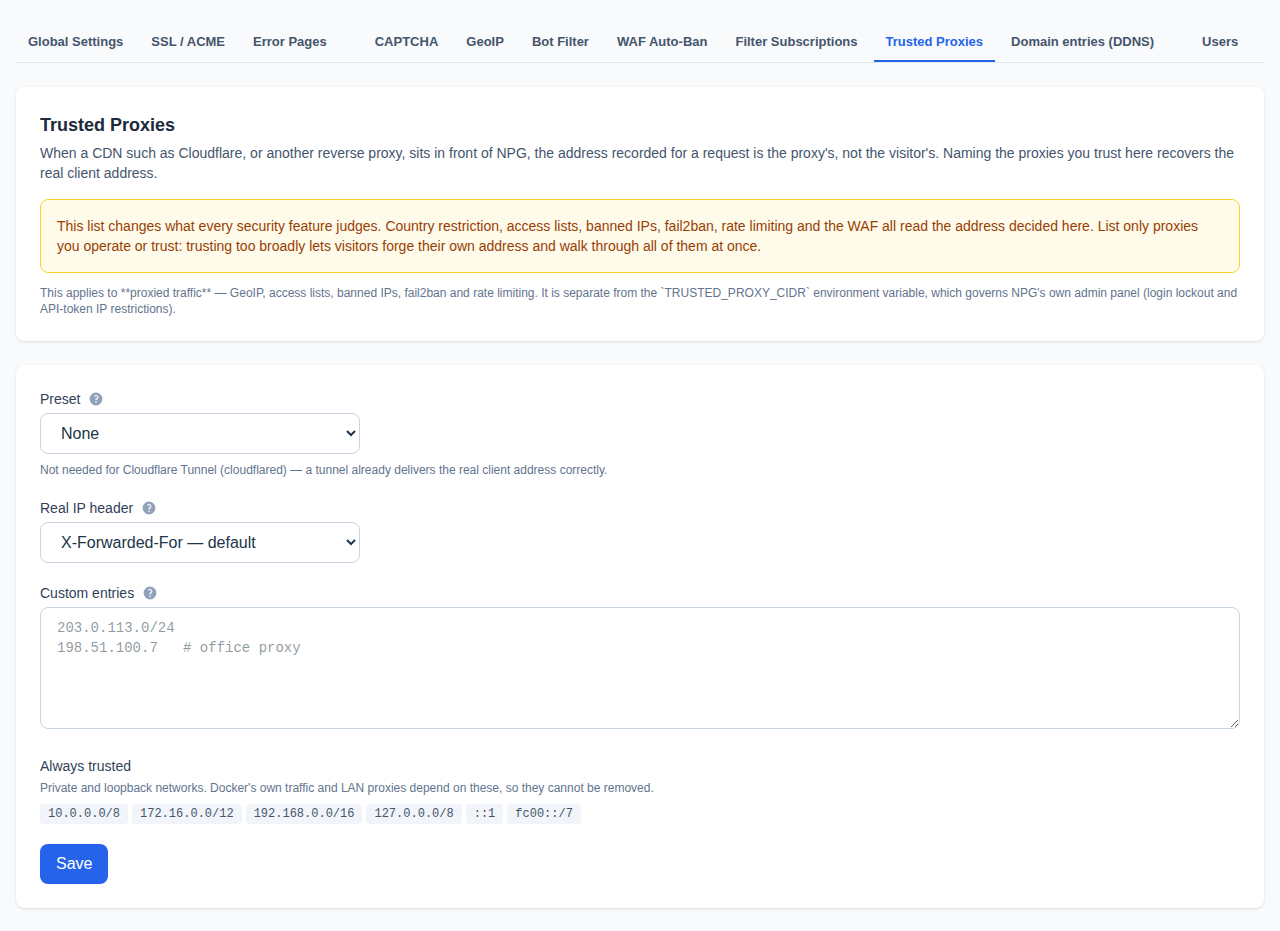
The Always trusted ranges (private and loopback networks) cannot be removed, because Docker's own traffic and LAN proxies depend on them. Trusting too broadly lets visitors forge their address, so list only proxies you run or trust.
This setting applies to proxied traffic. It is separate from the TRUSTED_PROXY_CIDR environment variable, which governs the admin UI's own login lockout and API token IP restrictions.
2. Use HTTPS between Cloudflare and NPG
What NPG needs depends on Cloudflare's SSL/TLS encryption mode.
| Cloudflare mode | NPG side |
|---|---|
| Full (strict) | The proxy host needs SSL Enabled and a valid certificate. Recommended. |
| Full | The proxy host needs SSL Enabled and a certificate. The certificate is not validated. |
| Flexible | Cloudflare connects to NPG over HTTP. With NPG's Force HTTPS on, this mode loops redirects. |
The DNS-01 method is the convenient way to get the certificate: it works whether or not port 80 reaches NPG, and it can issue wildcard certificates.
- In Cloudflare, create an API token with the
Zone:DNS:EditandZone:Readpermissions. - In Certificates → DNS Providers, click Add Provider, choose Cloudflare as the Provider Type and paste the token into API Token (Recommended). Check it with Test Connection and save.
- On the proxy host's SSL/TLS tab, choose + Create New Certificate and pick the new provider in DNS Provider (DNS Challenge). The full sequence is in Turning on HTTPS.

For domains under a two-level top-level domain such as .ai.kr, .pe.kr or .co.uk, the zone may not be found automatically. Then put the Zone ID from the domain's overview page in the Cloudflare dashboard into the provider's Zone ID field.
3. When DDNS manages the record
If your public IP changes, NPG's DDNS can keep the Cloudflare record up to date. Turn on DDNS Auto-Registration on the proxy host's Basic tab and choose a Cloudflare provider; the Cloudflare proxied option decides whether the record is orange-clouded. Record status is under Certificates → DDNS. See DDNS.
Check that it works
- Open the site from an outside network (for example mobile data), then open Logs → Access Logs. If the client IP is the device's public address and the country matches where you are, it works.
- Make sure the site opens without a 525 or 526 error.
Common problems
- 525 SSL handshake failed. Cloudflare could not complete a TLS connection with NPG. NPG refuses, at the handshake, any HTTPS connection whose name (SNI) matches no proxy host. Check that the domain is in the proxy host's Domain Names, and that SSL Enabled is on with a certificate selected on the SSL/TLS tab.
- 526 Invalid SSL certificate. In Full (strict) mode, NPG's certificate is not valid. Check in the Certificates → Certificates list whether it is self-signed, expired or for another domain.
- Endless redirects. Cloudflare is in Flexible mode and NPG's Force HTTPS is on. Switch Cloudflare to Full (strict).
- Visitors from allowed countries are blocked. Check that the trusted proxies from step 1 were saved. Log entries from before saving keep the Cloudflare address.
- You added
set_real_ip_fromto a host's Advanced config and country blocking did not change. A value set per host reaches the logs but not the GeoIP, access list, bot filter or WAF decisions. Remove it and use Settings → Trusted Proxies. - DNS-01 issuance fails with a propagation timeout. Check that the API token has
Zone:Read. Other causes are in When a certificate won't issue.